8 Best Shadow AI Management Platforms for 2026, Compared
Compare shadow AI management platforms with AI governance and TPRM tools, see the capabilities that matter, and find the best platforms for each category.

Bhagyashree
2026 State of Agentic AI Security
How ready is your organization to secure AI agents?
3 quick questions. See how you compare to other security leaders.

Shadow AI describes the use of Artificial intelligence (AI) by employees that is not sanctioned or visible to IT. By enabling the use of unapproved AI tools, such as chatbots, coding assistants, and browser extensions, shadow AI creates security and compliance risks for enterprises and exposes sensitive data to outside entities. Shadow AI Management solutions can help organizations by scanning traffic in private and public clouds, endpoints, or software-as-a-service (SaaS) logs to detect and govern the use of AI tools by employees.
These platforms track the use of shadow AI within the enterprise, identify sensitive data at risk of being entered into or exposed to AI models, evaluate the detected risks, and allow actions to either stop unauthorized AI tools or configure their use. The main purpose of shadow AI management platforms is to balance the risks and opportunities of using AI tools at work.
While allowing employees to use AI applications that may boost productivity, shadow AI use creates compliance, data security, and third-party risk challenges. This blog explores shadow AI management platforms and their impact on organizational security teams.
8 Best Shadow AI Management Platforms, Ranked
The eight platforms below go beyond discovery to enforce policy on employee AI use. They are ranked on three things: how much of the employee AI surface each one sees (browsers, desktop apps, coding agents and MCP servers), how far its enforcement goes beyond alerts, and whether it can treat personal and corporate accounts differently. Akto publishes this guide. Details come from each vendor's public documentation as of November 2026. "Not documented" means we could not find the capability, not that it is missing, so ask the vendor.
Platform | Where it sees AI use | Enforcement actions | Agents and MCP | Personal vs. corporate accounts | Deployment |
|---|---|---|---|---|---|
1. Akto (Atlas) | Employee endpoints: browsers, desktop apps, IDEs and CLIs | Approve, restrict or block each tool by user and team; block prompts carrying secrets, source code or customer data | Local and remote MCP servers, agent skills and plugins; hooks into Claude Code, Cursor and GitHub Copilot | Detects personal accounts; supports blocking personal accounts as well as scoping guardrails to personal accounts while leaving out corporate accounts. | Hybrid, on premises or cloud |
2. Zscaler AI Endpoint Security | Managed devices, alongside Zscaler’s SSE traffic inspection | Allow, block, coach or isolate AI apps; inline DLP on prompts and uploads | Inventories AI browsers, IDEs, plugins, skills and MCP servers on the device | Tenant profiles and tenant restrictions limit AI apps to the corporate workspace, for example by ChatGPT workspace ID, and block personal instances | Zscaler client and cloud |
3. Netskope One AI Security | Inline network and SaaS traffic through the Netskope client | Real-time prompt DLP; block AI apps or coach users toward approved tools | Discovers MCP servers and clients; Agentic Broker controls access to public MCP servers, with a default-block option | Instance awareness tells personal from corporate instances of supported apps such as ChatGPT, Gemini and Copilot, with separate policies for each | Netskope SSE client and cloud |
4. Harmonic Security | Browser extension and endpoint agent, plus connectors for ChatGPT and Claude | Redact or block sensitive data with contextual feedback to the user | Local MCP Gateway covers MCP clients, servers and tool calls, including Claude Code, Codex CLI and Cursor | Identifies the account type and subscription plan, so corporate and personal accounts can get different policies, such as coaching or blocking sensitive data on the personal one | Browser extension, endpoint agent and local gateway on Windows, macOS and Linux |
5. Prompt Security (SentinelOne) | Browser extension and endpoint agent | Prompt redaction and blocking; allow, block or redact on each MCP call | Shadow AI across browsers, IDEs, terminal assistants and MCP servers, with an MCP gateway | Not stated on Prompt Security’s public pages; hands-on testers report separate “Personal” and “Enterprise” rules for apps such as ChatGPT | Browser extension and endpoint agent |
6. WitnessAI | Network layer, without browser extensions or endpoint clients | Allow, warn, block or route by intent | Agentic Control discovers agents in IDEs, apps, frameworks and the cloud, and the MCP servers they reach | Not documented on WitnessAI’s product pages | Proxy chaining with existing SSE infrastructure, API integration or Witness Anywhere |
7. Microsoft Defender for Cloud Apps and Purview | Defender for Endpoint signals, Purview DSPM for AI and Edge for Business | Sanction or unsanction AI apps and block them on onboarded devices; Endpoint DLP blocks sensitive pastes and uploads | Agents inherit the controls of their parent AI app | Entra tenant restrictions v2 can block sign-in with personal Microsoft accounts, including consumer Copilot; it does not cover ChatGPT, Claude or Gemini logins | Microsoft 365, Defender and Purview services |
8. Nudge Security | Email, OAuth and API connectors plus a browser extension | Alerts, browser nudges and playbooks that guide employees rather than block inline | Discovers agents built in Copilot Studio, Agentforce, n8n and other platforms, plus remote MCP connections | Does not directly detect accounts created with a personal email address, per Nudge’s FAQ | SaaS, with email, API and SSO integrations |
Which Shadow AI Management Platforms Show Actual Employee AI Usage?
Platforms that show what employees actually do with AI, not just which AI domains they visit, include Akto, Zscaler AI Endpoint Security, Netskope One AI Security, Prompt Security (SentinelOne) and WitnessAI. "Actual usage" means the platform can tell you which person used which tool, how often, and what data they sent to it. The main difference between platforms is where they collect that signal.
Platform | Where it sees usage |
|---|---|
Akto | Endpoints, covering browsers, desktop apps, IDEs, CLIs and local MCP servers |
Zscaler AI Endpoint Security | Managed devices, covering AI apps, agents, skills and MCP servers |
Netskope One AI Security | Inline network and SaaS traffic, alongside Netskope’s CASB, secure web gateway and DLP products |
Prompt Security (SentinelOne) | Browser, through an extension that sees GenAI prompts |
WitnessAI | Network layer, without endpoint clients |
Where a platform collects its signal decides what it can see. Network and browser signals capture web AI use well. Endpoint signals also capture coding agents, CLI tools and MCP servers that never touch a browser. Ask each vendor to show per-user usage from your own environment during evaluation.
Why Shadow AI Discovery Alone Isn't Enough
Discovery tells you which shadow AI tools are in use. On its own, it does not tell you what to do about them. Each finding still needs someone to check it against policy, decide whether to approve, restrict or block the tool, and follow up, so a discovery-only tool often becomes another alert queue.
Visibility is also split across sources. Secure web gateways, CASBs, identity platforms and endpoint tools each see a different slice of AI use, and none sees all of it. A management platform ties those signals to one policy and acts on them, and that is the difference this guide ranks on.
Core Capabilities of Shadow AI Management Platforms
Effective shadow AI management relies on a specific set of technical capabilities, which together convert visibility into governable actions. The following capabilities are the functional core around which mature platforms in this category are built.
Cross-Source Aggregation
There is no single telemetry source that provides visibility into all AI usage, and industry analysis indicates that no single discovery method provides complete visibility; the objective is not to identify one perfect tool but to correlate enough signals across sources to build out a useful AI asset inventory. This means combining browser-level activity, network traffic analysis, identity provider and OAuth data, source code repository scanning, and cloud service logs into a single dataset. Many organizations have visibility into their existing infrastructure: a secure web gateway may capture AI domain traffic, a CASB may expose SaaS usage, and an identity platform may have OAuth grant data; without this aggregation, these become disconnected fragments rather than a coherent inventory.
Data Flow and Sensitive Data Monitoring
Knowing which AI tools are in use is different from knowing what data those tools are receiving. Data flow monitoring looks at content submitted to AI apps (via direct prompts, file uploads, or API calls) to identify sensitive information (personal data, source code, financial records, intellectual property) before it reaches an external system. Vendors in the space report substantial volumes of sensitive material passed through unmonitored prompts; for example, a single deployment surfaced thousands of instances of regulated data (e.g., routing numbers) entered directly into prompts across customer environments. This capability is usually provided via browser extensions or endpoint agents that can intercept data in real time, not just auditing after the fact.
Identity and Access Context
The ability to attribute activity to a specific identity is the fundamental capability that enables governance, and this now extends to AI. Platforms map discovered usage to user identities, service accounts, and permission scopes, exposing how a given tool interacts with enterprise data and which access rights it holds. This becomes materially more complex with autonomous agents: an AI agent acting on a user's behalf may have its own effective access to enterprise systems while remaining invisible to conventional identity and access management, since standard authorization frameworks often only authenticate the human's delegated consent, not the agent itself. Closing this blind spot requires treating agents as identities in their own right, assigning ownership, scope, and accountability, rather than as an extension of the human who configured them.
Automated Policy Enforcement
Having identified risk has limited value without the mechanism to act upon it. Automated policy enforcement allows organizations to codify acceptable-use rules and apply them when usage is occurring, including blocking unauthorized applications, tiered workflows for tools of intermediate risk, and controls based on data sensitivity or role. This is the capability that most distinguishes a management platform from a discovery tool: it acts on a violation automatically, rather than routing it to a queue to be reviewed.
Risk Prioritization and Scoring
Not all discovered AI usage has the same consequences, and it represents a misallocation of governance capacity to treat every instance with the same urgency. A composite risk score (typically weighted by data sensitivity, access scope, usage volume, and vendor security posture) allows governance teams to be able to review a triaged queue rather than an undifferentiated list. As a governance framework puts it, a developer's internal productivity script is a different priority than a customer-facing tool processing sensitive data, and scoring is what allows an organization to tell them apart at scale rather than reviewing both with the same attention.
Automated Remediation and Ticket Routing
To avoid findings becoming a backlog of unresolved items, mature platforms route identified risks directly into existing operational systems (IT service management platforms, ticketing queues, or access management tools) with severity, context, and a recommended action already attached. Established practice in adjacent security disciplines treats this as a tiered response: the highest-risk findings are addressed via automatic remediation, medium-risk findings generate a ticket for human review rather than a raw alert. Applied to shadow AI, this closes the gap between detection and resolution that was mentioned earlier: a finding does not sit in a dashboard waiting to be triaged, but is entering a workflow with a defined owner and next step already assigned.
Agent and MCP Connection Visibility
The introduction of the Model Context Protocol (MCP) and similar standards that enable agents to connect directly to enterprise tools, databases, and APIs has extended the shadow AI surface to include a new class of largely invisible machine-to-system activity. Traditional security monitoring tools do not have visibility into MCP interactions, and each MCP connection is a trust decision: a poorly secured or unauthorized server can be exposing data or executing actions without any human in the loop. Developers can, and routinely do, download open-source MCP servers from public registries to extend an agent's capabilities, often without any security review.
Platforms addressing this gap discover MCP servers and agent connections across the environment, mapping each to an owning agent, application, and set of accessible systems, and producing transaction-level records of what was accessed, by which agent, and through which server. This is materially different from standard shadow AI discovery platforms, which are oriented towards human-initiated browser and network activity; agent and MCP visibility governs autonomous machine-initiated connections that can operate continuously and at a scale much larger than manual review processes can manage. As agentic AI adoption continues to grow in enterprise environments, this capability is likely to move from being a differentiator into becoming a baseline expectation of any shadow AI management platform.
Personal vs. Corporate Account Control
The same AI tool can be safe on a company account and risky on a personal one. Corporate tenants usually come with enterprise data terms; personal accounts do not. A platform should tell the two apart and apply different rules: allow the corporate tenant, block or redirect sign-ins to personal accounts, and flag uploads to personal instances. Ask each vendor to show this on a live sign-in rather than on a slide.
In-the-Moment User Coaching
Blocking every risky prompt pushes employees toward tools you cannot see. Coaching shows a short message at the moment of risk: why the action is risky, which approved tool to use instead and, where policy allows, a way to continue with a stated business reason. That reason becomes a record for review. Check whether coaching works outside the browser too, in desktop apps, IDEs and coding agents, where much shadow AI now runs.
How Shadow AI Management Works, Step by Step
Shadow AI management is not a discrete activity, but part of an ongoing cycle. Finding an unauthorized tool is the beginning of the process, not the end, and the value of a management platform is found in the defined sequence of steps that come next as new tools and new patterns of use emerge.
Detect
Discovery is iterative, using browser, network, identity, code, and cloud logs to find AI usage across the enterprise that has not been reviewed or procured through sanctioned channels. The emphasis at this stage is on simply finding what exists; judgment about the potential impact of a tool is deferred until later in the process. The consensus among governance practices in the space is that no single technique will capture every potential instance, and the emphasis is on finding enough information across sources to build a defensible inventory, as opposed to relying on any one detection method to identify every potential instance.
Assess
All identified tools or agents are scored according to their risk profile: the sensitivity of the data they can access or process, the range of available actions within their capabilities, whether there is an explicit business justification for their use, and whether it is possible to bring them into the company's governed management ecosystem as opposed to simply removing them.
This step serves to distinguish between the discovery of an employee who has downloaded the public interface of an approved model on their own time and the discovery of an autonomous agent with write access to a critical data repository, both of which would be categorized as shadow AI, but with vastly different downstream implications.
Prioritize
A triage process prioritizes findings based on an overall risk score, focusing resources on those instances with the potential to cause the greatest harm if left unaddressed. A discovery queue that uses uniform urgency across all findings will see the largest impacts addressed while lesser ones fall by the wayside, and prioritization scoring actively works to avoid that outcome, ensuring that the risks are seen in context rather than as isolated incidents. One example of this principle in practice is the differentiation between a finding that represents a developer's personal script and a finding that represents a production-facing tool with access to sensitive data.
Remediate
Assessment and prioritization lead to action, which can take many forms depending on the tool, its impact, and the likelihood of future recurrence: migration to a governed instance, restricted access permissions, formal deprecation, or, in cases where risk is low enough, approval of continued use by an owner. It is important to note that this step is not inherently about blocking a remediation process that only considers removal misses an opportunity to migrate a risky instance or restrict its capabilities in a way that reduces risk without eliminating utility.
Monitor
Tools that have been migrated, restricted, deprecated, or approved for continued use are returned to the system for ongoing monitoring in their new state. With sanctioned instances, this means ensuring that they continue to operate in a manner consistent with their approval; in other words, that the parameters of access and use have not been expanded beyond what was reviewed and authorized. This serves to close the loop, and the next steps are determined by whether and how the parameters of a given tool have changed, potentially introducing new risks, or if it has remained in a stable state.
How to Run a Shadow AI Management Program
A platform enforces policy, but someone still has to decide what the policy is and whether it is working. These four pieces turn the workflow above into a program you can report on.
Three policy tiers
Most programs settle on three tiers rather than a simple allow or block. The middle tier is where most tools land, and it is the one that keeps employees on visible tools instead of pushing them further into the shadows.
Tier | What it means | Examples | Platform action |
|---|---|---|---|
Approved | Sanctioned for work data under set conditions | Corporate tenants of ChatGPT, Claude, Gemini or Microsoft 365 Copilot | Allow, log usage and apply DLP |
Allowed with limits | Usable for low-risk tasks with no sensitive data | Public AI tools used for drafting or research | Allow with coaching; redact or block sensitive data; block file uploads |
Blocked | Unacceptable data terms, unmanaged risk or no business case | Unreviewed browser extensions, unknown MCP servers, personal accounts used for work data | Block and point the employee to the approved alternative |
A four-stage maturity model
Unaware. There is no inventory. The AI policy is a document, and shadow AI is found by accident.
Visible. Discovery runs across browsers, endpoints and SaaS connections. Each tool has an owner, but nothing is enforced yet.
Enforced. Policy tiers are enforced inline. Sensitive data is redacted or blocked, coaching is live and new tools are routed to review.
Governed. AI agents and MCP servers are in scope, findings feed vendor risk and governance records, and leadership reviews the KPIs every quarter.
KPIs to track
Share of discovered AI tools with a named owner and an assigned tier
Median days from discovery to a tier decision
Share of AI activity on approved corporate accounts rather than personal ones
Sensitive-data events blocked or redacted each month, and the trend
AI agents and MCP servers in use without an owner or a review
Repeat violations by the same user after coaching
Your first 30 days
Week 1: Turn on discovery across browsers, endpoints and SaaS connections. Do not block anything yet.
Week 2: Review the inventory with IT, legal and procurement. Give each tool a tier and an owner.
Week 3: Enforce the blocked tier and personal-account rules. Turn on coaching and sensitive-data redaction for the allowed-with-limits tier.
Week 4: Route newly found tools into vendor risk review, publish the approved list, and set a monthly KPI review.
How to Evaluate a Shadow AI Management Platform
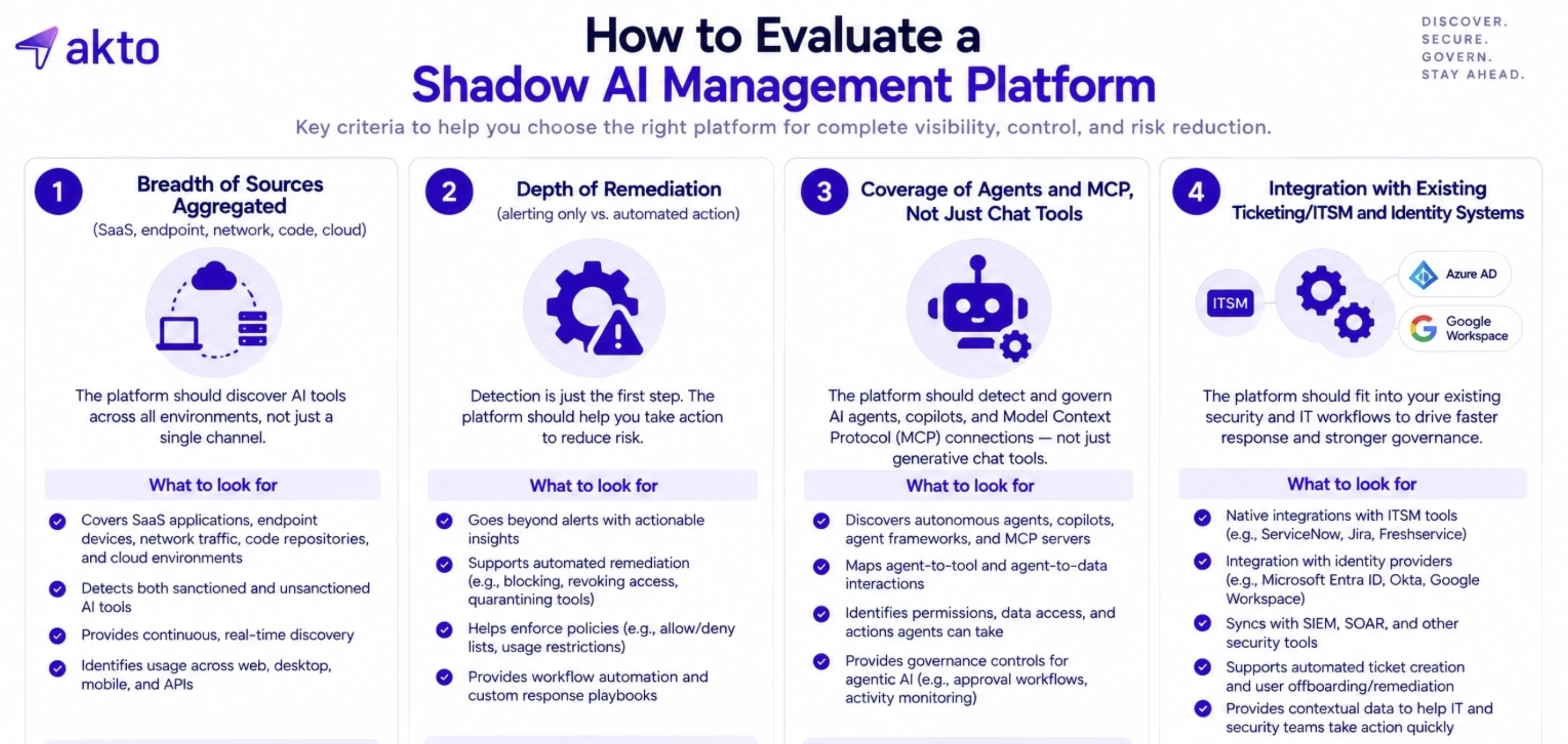
Vendor evaluation in this space is complicated by the fact that most platforms can produce an impressive feature list, dashboard demo, or integration count, while varying significantly in what they actually accomplish when deployed, and criteria that distinguish a truly capable platform from one that simply looks comprehensive tend to fall back to four questions.
Breadth of sources aggregated.
How completely does the platform see AI usage, and does that visibility rely on a single detection method, which misses any shadow AI activity that goes uncollected through it? Platforms using a single signal source such as network traffic, or a fixed integration library, miss out on the portion of shadow AI activity that takes place outside that channel (personal account and hotspot traffic, or browser use, respectively). Platforms that excel instead detect activity across SaaS applications, endpoint/browser activity, network traffic, source code repositories, and cloud environments, then correlate the findings into a single inventory.
Similarly, how does a platform detect tools it does not already recognize? Vendors relying on a pre-built, hard-coded integration library often require months to add support for a newly popular application, during which time that tool is invisible to the platform regardless of how many sources are being monitored. Evaluation, then, should directly ask how coverage works, rather than asking how many applications a vendor currently supports on paper, and whether it relies on OAuth monitoring, behavioral analysis, and API-level tracking capable of surfacing a tool the vendor has never seen before.
Depth of remediation
What does a platform do once it identifies a risk, and is it capable of automatically taking action as well as detecting? A platform that alerts or flags permission or policy violations without a corresponding action pathway simply shifts remediation responsibility to overwhelmed security teams, replicating the alert-fatigue problem it is meant to solve under a new label. Evaluation should distinguish platforms that stop at notification from those capable of automated action, such as real-time blocking of unauthorized access, revoking credentials automatically, or routing a finding directly to a remediation workflow with an assigned owner and next step already attached.
This is the space where discovery-oriented tools and true management platforms diverge most visibly, and is worth testing concretely: for a given class of finding, does the platform take action, or simply create another item for a security analyst to triage?
Coverage of agents and MCP, not just chat tools
A platform's usefulness is increasingly determined by whether its detection model extends beyond public chatbots and browser tools to cover autonomous agents and Model Context Protocol connections, and whether it can discover every agent and MCP server in the environment. Buyers should ask directly whether a vendor can discover every agent and MCP server in the environment, including those deployed without any security review, since teams now stand up agents and connect them to MCP servers considerably faster than most security review cycles can track. A platform built around chat-interface monitoring will not surface an agent that was never used interactively by a human, even though it may have direct, continuous access to sensitive systems.
Evaluation at this layer should examine whether the platform treats agent risk with criteria suited to how agents behave (short-lived, high volume, often over-privileged, and capable of taking actions that are technically valid but logically inappropriate) rather than applying static, chatbot-era risk models to a fundamentally different category of activity.
Integration with existing ticketing and identity systems
The final criterion concerns how well a platform fits into infrastructure the organization already operates, rather than requiring a parallel governance stack. Findings that cannot be routed into an existing IT service management or ticketing system tend to be siloed in a vendor dashboard, disconnected from the workflows a security team actually uses day to day. Strong integration should allow a finding to generate a ticket with context and severity already attached, assign it to the appropriate owner, and track its resolution status without manual re-entry into a separate system of record.
Equally important is integration with existing identity infrastructure. Because a substantial share of shadow AI risk is now expressed through non-human identities (service accounts, API keys, OAuth tokens, and agent credentials), a platform that cannot connect its findings to the organization's identity provider will struggle to answer basic governance questions, such as which owner is accountable for a given credential or whether a flagged identity's access is consistent with least-privilege policy. Platforms that integrate cleanly with both ticketing and identity systems reduce the operational overhead of adoption and make it more likely that discovered risk is actually resolved, rather than simply documented.
Shadow AI Management vs. Discovery, AI Governance and TPRM Platforms
Buyers often treat these four tool types as one category, but they solve different problems. Shadow AI tools work on the technical side: finding AI in use and controlling it. AI governance and TPRM platforms work on the oversight side: deciding what’s allowed and assessing the vendors behind each tool. Most enterprises need both sides connected.
Shadow AI discovery tools
Discovery tools answer one question: “Which AI tools are in use across the company?” They scan networks, cloud environments or endpoints and return a list of tools found, with usage frequency and users. Their output is an inventory, the starting point for every other step.
Shadow AI management platforms
Management platforms answer the next question: “What do we do about it?” They build on discovery data, or collect their own, and add enforcement: blocking or restricting unauthorized tools, protecting sensitive data, running approval workflows for new tools, and collecting evidence for audits.
AI governance platforms
AI governance platforms answer “Which AI uses are approved, and under what conditions?” They maintain an AI registry, run risk assessments, route approvals and map controls to frameworks such as the EU AI Act, NIST AI RMF and ISO/IEC 42001. They depend on an accurate inventory of AI in use, which discovery provides.
Third-party risk management (TPRM) platforms
TPRM platforms answer “Is the vendor behind this tool safe to work with?” They run security questionnaires, review SOC 2 and ISO reports, and track contract and data processing terms. They assess the company, not the day-to-day usage of its tool.
Shadow AI discovery | Shadow AI management | AI governance | TPRM | |
|---|---|---|---|---|
Core question | What AI is in use? | What do we do about it? | Which AI uses are approved? | Is this vendor safe? |
Main output | AI tool inventory | Enforced policies and audit evidence | Registry, risk assessments, approvals | Vendor risk ratings and reviews |
Typical owner | Security | Security | Governance, risk and compliance | Procurement, vendor risk, legal |
Feeds into | Management, governance and TPRM | Governance evidence | Policies that management enforces | Governance approval decisions |
The four connect as one loop:
Discovery finds a tool.
TPRM assesses its vendor.
Governance sets the policy.
Management enforces it.
Best Platforms for Third-Party AI Tool and Vendor Governance
No single platform covers every part of third-party AI governance, so the strongest programs combine one platform from each category below. Platforms are listed alphabetically within each category, and the order isn’t a ranking.
Shadow AI discovery and enforcement platforms
These find the third-party AI tools, agents, and MCP servers employees use and enforce policy on them.
Akto: Akto Atlas discovers AI tools employees use across browsers, desktop apps, IDEs and CLIs, including local and third-party MCP servers. It approves, restricts, or blocks each tool by user and team, and stops sensitive data before it reaches an external AI service. Akto Argus extends discovery and runtime guardrails to the AI agents a company builds.
Netskope One AI Security: covers consumer AI, enterprise AI, and agentic AI on the same platform as Netskope’s CASB, secure web gateway, and DLP products.
Prompt Security (SentinelOne): browser-based visibility and control over employee GenAI use.
WitnessAI: network-layer observation and control of AI usage, without endpoint clients.
Zscaler AI Endpoint Security: inventories and monitors AI apps, agents, skills, and MCP servers on managed devices.
Best for: security teams that need to see and control which third-party AI tools are actually in use.
AI governance platforms
These run the registry, risk assessment, and approval workflows for AI use cases.
Akto, Credo AI, Holistic AI, IBM watsonx.governance, OneTrust AI Governance, and Trustible are all great options for AI governance.
Best for: governance, risk and compliance teams that need one system of record for approvals and regulatory mapping.
Third-party risk management (TPRM) platforms
These assess the vendors behind third-party AI tools: their security posture, certifications and contract terms.
Mitratech Prevalent: automates vendor risk assessment, monitoring and remediation across the third-party lifecycle.
OneTrust Third-Party Risk Management: centralizes a vendor register and automates due diligence workflows, and pairs with OneTrust AI Governance for AI vendor reviews.
SecurityScorecard: security ratings for continuous outside-in monitoring of vendors.
UpGuard: vendor risk assessments combined with continuous third-party monitoring.
Vanta: runs vendor reviews alongside compliance automation in one system.
Whistic: trust catalogs that let vendors share their security posture for faster reviews.
Best for: procurement and vendor risk teams that review each AI vendor before approval.
How to combine them
Start with discovery and enforcement, because the other two categories depend on knowing which AI tools are in use. Feed each newly discovered tool into a TPRM review, record the decision in your AI governance platform, and enforce that decision at runtime. For how Akto covers the discovery and enforcement layer, see Akto Atlas and Akto’s AI security platform.
How Akto Manages Shadow AI
Shadow AI deployment is rampant, with employees embedding AI agents into critical workflows, spinning up MCP servers, and adopting copilots at a faster rate than security teams can audit; by the time they are discovered, the tool is already deeply integrated into the production environment.
Akto is a dedicated control plane for AI agents, agentic ecosystems, and the LLMs that power them. With continuous discovery across browsers, endpoints, IDEs, and cloud infrastructure, Akto finds what traditional tools miss while delivering an additional layer of defense by analyzing the Agentic Context Graph, the connections between agents, tools, prompts, and permissions that provide insight into risky orchestration, prompting, and permissions practices.
The findings are prioritized based on the level of exposure of the risky asset, with suggested runtime guardrails instead of queued-up remediation for faster response times. Because AI deployment is continuous, Akto secures the ecosystem with continuous discovery, red-teaming, and enforcement - providing visibility and control without impeding productivity.
See your AI attack surface for what it really is. Get an Agentic AI Security demo of Akto and turn shadow AI into governed AI before the next agent gets deployed without you.
Final Thoughts on Shadow AI Management Platforms
New agents, tools and MCP servers appear every week, so a list of unauthorized tools goes stale quickly. The platforms that rank highest here pair discovery with enforcement: they approve, restrict or block each tool by user and team, and keep doing it as usage changes. That is how shadow AI becomes governed AI without pushing employees toward tools you cannot see.
FAQs on Shadow AI Management Platforms
1. Do shadow AI management platforms include coverage for AI agents and MCP connections?
While it is becoming more common for leading platforms to do so, it is far from universal, and an important differentiator: many platforms were initially focused on browser and chatbot detection, and require significantly different detection algorithms to spot autonomous agents and Model Context Protocol servers. Buyers should look for platforms that can detect agents and MCP connections deployed without security review, not just AI usage initiated through a human interface.
2. How do shadow AI management platforms aggregate findings across browser, network, identity, and cloud sources?
Since no single source will provide complete visibility on its own, platforms will typically pull in signals from multiple layers, such as browser and endpoint activities, network traffic, identity provider and OAuth logs, code repositories and cloud service inventories, and correlate them into a unified inventory. It is this aggregation that enables a platform to identify patterns across disparate areas and tie them to a common root cause, rather than presenting them as unconnected findings.
3. What's the difference between alerting on shadow AI and actually governing it?
When it comes to shadow AI, alerting only goes so far: a true governance solution will not only identify risks but also enact appropriate policy enforcement, such as automatically adding the risk to a ticketing system or identity governance workflow with an assigned owner and remediation task. While alerting helps reduce risk, it tends to result in a larger volume of tickets and unresolved findings over time.
4. Can these platforms manage shadow AI without banning tools outright?
Many mature platforms offer a middle ground between outright banning and allowing potentially risky shadow AI tools to proliferate unabated: assessing each instance based on risk, with options to enforce conditional restrictions or a tiered approval process for specific use cases, and the option to allow sanctioned use of a tool under specific circumstances.
5. What role do AI agents play in automating shadow AI remediation?
AI agents are playing an increasing role in helping organizations both identify and remediate shadow AI: evaluating each finding against corporate policies, and either recommending or automatically executing a remediation script or policy change, or escalating the issue to human operators with suggested actions for review.
Experience enterprise-grade Agentic Security solution