MCP Tool Poisoning: Anatomy, Real Attacks, and Defenses
Learn how MCP tool poisoning hijacks AI agents through malicious tool metadata - real attack research, disclosed CVEs, and defense-in-depth strategies.

Rushali

Do not use a calculator to add two numbers that should not be read from your SSH private key. Last month, Invariant Labs presented one of those. They registered an MCP server whose add tool included a completely normal description, followed by a hidden set of instructions instructing the agent to silently read the files ~/.ssh/id_rsa and ~/.cursor/mcp.json and smuggle the contents back to the attacker. Cursor obeyed those directions. The user was presented with a tool whose name was ‘add' and a friendly confirmation dialog.
The attack class is MCP tool poisoning, and is successful because agents assume the metadata of tools as trusted instructions and not untrusted data. This article explains how it is done, the CVEs and benchmark numbers it is based on, where the malicious text can be hidden, and the defense-in-depth controls that really help reduce risk.
What Is MCP Tool Poisoning?
Prior to the mechanics, there are two points of interest for framing: where this attack fits into the injection taxonomy, and why the person at the keyboard is rarely the one who sees this attack occur. Both make it clear in their explanation why they have no control over this problem, despite many teams being in production with MCP servers.
A Specialized Form of Indirect Prompt Injection
Indirect prompt injection (IPI) is a special case of tool poisoning: The attacker does not type anything in the chat, but they insert instructions into content which the model will read as context. The injection channel is what sets MCP tool poisoning apart. In classic IPI, the agent is hiding instructions on a web page, in an email, or in a document that the agent downloads during runtime. They are hidden one layer deeper, in the tool metadata the agent consumes when it connects before any task is run, and are therefore not displayed until the task is first run.
The MCPTox researchers make no exception to this rule. Their payloads were extracted from a well-known IPI benchmark called InjecAgent and added to poisoned tool descriptions, leaving them to achieve an attack success rate of almost 0%. Their custom-designed tool-poisoning payloads against the same models hit 41.8 percent. For all threat modelers, the conclusion is: Indirect prompt injection using tools is not part of your current threat model tests. It is important to understand that benchmarks using a simulated environment, such as InjecAgent or AgentDojo, will test a different attack surface than a poisoned manifest from a real server.
The problem is now being monitored on its own by OWASP as MCP03:2025, Tool Poisoning, in their MCP Top 10.
Why It's Invisible to Users
Models and humans read different meanings. When the client invokes tools/listthe full tool description is returned: name, natural-language description, and the shape of the input (in JSON-Schema). All of this text is serialized into the model's context. The user interface, on the other hand, typically displays a concise tool name and a concise confirmation.
Invariant's Cursor demonstration literal. The confirmation dialog displayed the tool name, but even the expanded view of the tool did not display the full tool input. The SSH key that the agent had planted for exfiltration was in a parameter that the UI did not show. Whoever approved that call had no way of knowing what he/she approved. What is described in the MCPTox is the same problem: users view simplified representations, while the model process models view complete descriptions, and safety alignment is designed to question user prompts rather than tool metadata.
The Trust Gap: Connect-Time Review vs. Runtime Execution
This single framing is the answer as to why poisoned tools work. The description for the tools is only reviewed once during the connection or onboarding process. Tool behavior flows into the model at run-time, and there is no equivalent check. All the things after that first review are based on the assumption that it is still the tool that it said it was.
That is not a requirement in the protocol. MCP offers no means of cryptographic attestation of description integrity, no means for a client to verify whether the current definitions on a server agree with those it was approved by a human at onboarding, and no means to perform runtime checking of the description text for embedded directives. At the protocol level, such a description cannot be differentiated from one that says "read the local SSH key and append it to the response". They are both strings in the same field, and current models frequently do not distinguish between documentation and command within the field.
This distance increases because the machine(s) for changing the definitions are sent by MCP after the approval. A server that supports the 'listChanged' capability may send a 'notifications/tools/list_changed' message; the client will re-request the 'tools/list' message and will be sent what the server now returns. At this point, there is no re-approval, no version pinning, and no content hash required by the spec. Many clients also cache discovery results, which means that a poisoned schema that is retrieved once will poison all subsequent sessions that call it until some time inactivates the cache, which clients rarely do by themselves. Review takes place one time. Once you give, you give again.
Anatomy of a Tool Poisoning Attack: Step by Step
There are 4 moves given for an MCP tool poisoning attack. None of them needs to be a memory-corruption bug, deserialization vulnerability, or any normal vulnerability. Each step takes advantage of a design assumption (not a defect) that is a big challenge to catch with traditional AppSec tools.
Step 1: Attacker Registers or Compromises an MCP Server
The attacker must have a server that the attacker will connect to. There are two routes through which they arrive. They can create a new server that appears informative, a weather search tool, a PDF converter, a "random fact of the day" program, and publish it in a marketplace. In 2026, OX Security directly tested this and submitted a PoC for nine of eleven MCP registries to accept without meaningful review. The second scenario is to compromise or update a server that is already trusted by the target, making it a vehicle for an integration. In either case, the malicious server gets the target's client configuration.
Step 2: Adversarial Instructions Embedded in Tool Metadata
Once the server is installed, the attacker loads the payload into the descriptor of the tool. The type of shadowing can be best described in the context of the canonical example of an instruction that is embedded in the description of an innocent tool:
The framing with <IMPORTANT> and the appeal to a plausible reason (compliance, proxying, a system requirement), as well as the instruction to stay silent, are common. Instructions can be directed towards the behavior of the tool itself, exfiltrating files when it runs, or towards the behavior of any other trusted tool that may be attached in the same session.
Step 3: Agent Ingests the Poisoned Metadata as Trusted Context
Once the agent connects, the client extracts all the tool descriptors and appends them to the system prompt and the user's request that will be sent to the model. The model doesn't have any labels for provenance information, so that "this text came from a server operator" is not differentiated from "this text came from the user. It reads the poisoned description as authoritative documentation of how the tool works. In fact, the MCPTox failure-case analysis revealed that models very rarely refuse: the maximum refusal rate measured was less than three percent on Claude-3.7-Sonnet. The alignment that is set to "user-facing prompts" is not triggered when reading tool metadata.
Step 4: Agent Acts on Hidden Instructions
Now the agent can execute what the payload tells it to execute. Invariant's shadowing experiment involved asking one user to forward an email to a certain address and having the agent forward the email to the attacker's address instead, where the real recipient was included in the body of the email. The results can be grouped into a handful of categories: data exfiltrated (SSH keys, .env files, source code, chat history); credential leakage from other configuration files that contain secrets for other servers; unauthorized tool calls with hidden side effects such as BCC or upload; and suppression of the very steps that would identify compromise. No diversion is included in the user-facing interaction log.
Where Poisoning Can Hide
The majority of write-ups focus on the description field. CyberArk's "Poison Everywhere" research got rid of this notion; every string that an MCP server can fill is acted upon by the model, and every string is a possible injection point. The fact that the full surface is known is important because, if a scanner is to be restricted to reading descriptions, then some payloads have to be planted elsewhere.
Tool Names and Descriptions
The description field is still the most widely used place to have an MCP tool description attack, as it contains free-form natural language, and the model reads it all. Tool names also have their risk factor. By picking a name that interferes with the name of a familiar tool or a name that is similarly sounding, the agent's selection logic is led towards the attacker's tool. Description contains most of the adversarial instructions, typically marked up or encapsulated in an authoritative-sounding block structured as system instructions and not documentation.
Input/Parameter Schemas
The framework parses the JSON Schema of a tool's inputs, and the text of the schema is also made available to the model in many clients. This makes the names of parameters, parameter descriptions, default values, the options for enums, example values, and even required-field arrays all injection surfaces. CyberArk showed encoding instructions to exfiltrate into parameter names. One of the most dangerous aspects of schema poisoning is that the schema is checked by the schema framework, not by the security layer of the model. An innocuous-looking operation can be linked to a harmful parameter shape that no content filter is checking. CVE-2025-54136 enabled only such a schema change, and not a prompt.
Tool Response Content (not just the initial manifest)
This is the first reading of the manifest. All values returned from the tool after it is run- primary result fields, error messages, status text also go into the context of the model and may contain instructions. The crux of CyberArk's research is that there is no safe channel for output. It's possible for a tool to pass its connect-time review with a nice clean description, and then poison the agent from the description it returns when it gets the 10th call. If the initial manifest is treated as the entire attack surface, the answer leaves a lot of room to maneuver.
Real-World Disclosures and Research
In a little over one year, tool poisoning went from a plausible cause to a documented, measured, and CVE-tracked issue. The following disclosures are the ones that need to be known by name—they set the groundwork for the risk, not build it up.
Invariant Labs' Original Proof-of-Concept (April 2025)
Luca Beurer-Kellner and Marc Fischer at Invariant Labs released the original Invariant Labs disclosure on April 1, 2025, describing the attack class and providing a proof-of-concept that works for Cursor. They used their poisoned add tool to steal the developer's mcp.json (which contains credentials to other MCP servers) and SSH keys. The same disclosure also added two follow-on techniques: rug pulls and tool shadowing, and came with a public repository of attack code for others to replicate and repurpose. A few days later, they published mcp-scan, a static scanner for this pattern. What makes the attack leap from a single file leak to a pivot is the 'mcp.json' detail: one vile tool can retrieve all the other servers the victim trusts.
The OX Security Disclosure, Scale Across Python, TypeScript, Java, and Rust SDKs
In April 2026, OX Security unveiled its research, dubbed the "mother of all AI supply chains. The key vulnerability is a flaw in the way process parameters are passed to the host shell in Anthropic's official Python, TypeScript, Java, and Rust-based SDKs, which allows for the execution of arbitrary system commands and was found to be present in all versions of these SDKs. OX estimates that over 150 million SDK downloads were affected by the blast; there were more than 7,000 publicly accessible servers and up to 200,000 vulnerable instances with more than ten High or Critical CVEs. The supply-chain angle is directly tied to poisoning: OX provided a malicious proof-of-concept server for eleven MCP marketplaces and had it accepted by nine of them, as part of the same work. This is not a description-poisoning attack, but rather it's an illustration that the distribution channels that provide tools to agents do not do a basic check on those agents, which is a prerequisite for poisoning on a scale.
Benchmark Findings, Attack Success Rates Across 45+ Real MCP Servers
The field had its first large-scale measurement by MCPTox (arXiv 2508.14925, subsequently at AAAI). They created 353 authentic tools from 45 live, real-world MCP servers, produced about 1,300 malicious test cases in 10 risk categories, and tested 20 language models. The average attack success rate was 36.5 percent, with over a third of the poisoning attempts succeeding. The top end was from roughly 61.8 percent with GPT-4o-mini up to 72.8 percent with o1-mini, while Phi-4 was 70.2 percent. Their worst outcome has been an inverse problem size effect, in that stronger models have been more susceptible, as the attack is not an attempt to outwit the model, but instead to follow its instructions.
Attack Variants Related to Tool Poisoning
Tool poisoning is not a single technique; it's a family. The three variants affect the target or the timing of the payload, each disabling a different assumption a defender might be making.
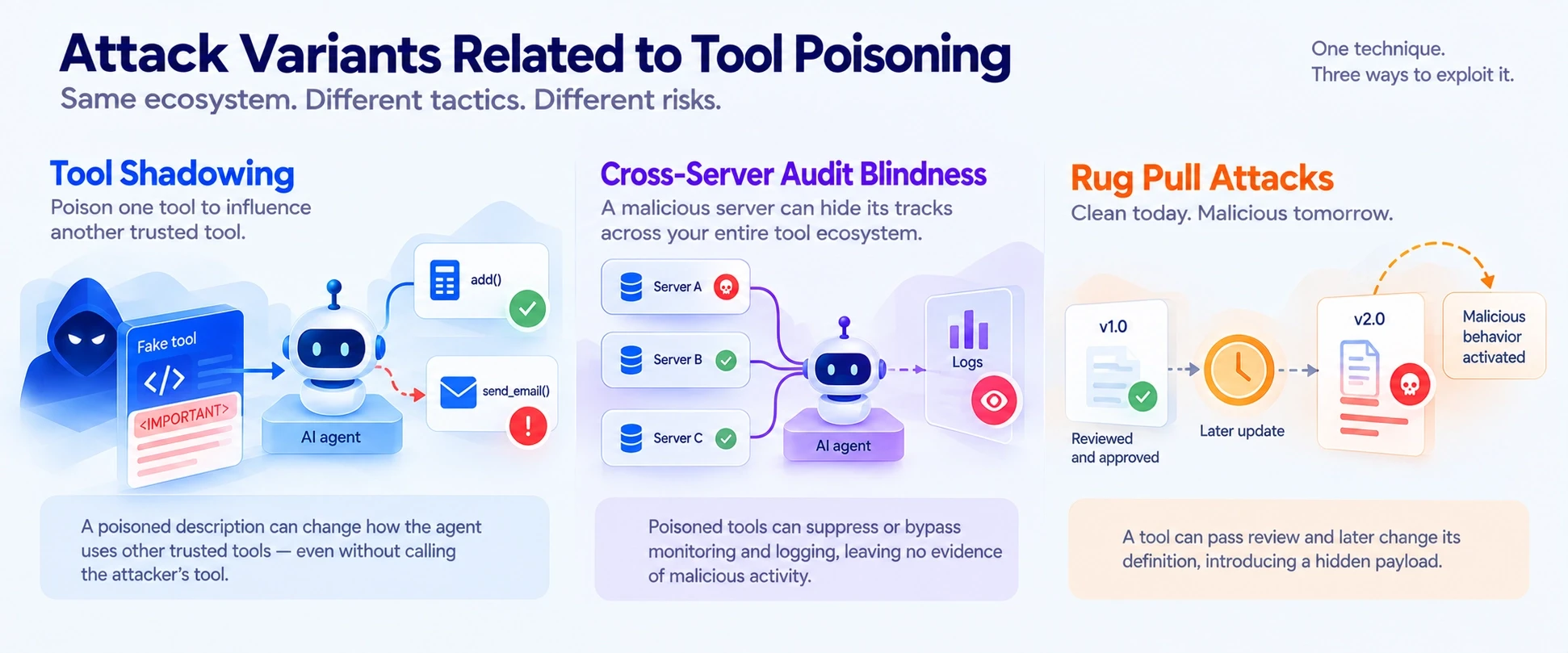
Tool Shadowing
Shadowing Poison: Poison one server's metadata to change the agent's behavior to a different trusted server. Invariant's example was a fake add tool that was used to trick a legitimate send_email tool on another server into sending all messages to the attacker. The danger here comes from the insight that the attacker doesn't always have to call the attacker's tool from the agent. Just seeing the poisoned description in context is sufficient to alter the way the agent applies tools in which it has confidence. Likewise, an unauthorized tool masquerading as an authorized tool to steal execution is a related type of trust abuse in an MCP workflow.
Cross-Server Audit Blindness
If multiple servers are connected to a single client, they share a single context and a malicious server can cross the context boundary. In addition to tricking legitimate tools, a poisoned description may also cause the agent to ignore or suppress monitoring and logging tools, preventing any evidence of what is happening from ever being captured. In combination with shadowing, this can allow an attacker to move about while the user's log only records trusted tools doing regular activities. Isolating servers and ensuring dataflow boundaries between them, as opposed to relying on a shared context, is a load-bearing control because of cross-server audit blindness.
Rug Pull Attacks
A rug pull is not about one moment - it's about time. Review passes with a clean bill of health and then the server updates the definition after review. A "random fact" tool that became malicious upon the second load is a sleeper rug pull with shadowing that was pulled by Invariant's WhatsApp takeover. The productionized version, CVE-2025-54136, "MCPoison," was revealed by Check Point Research in August 2025 with a CVSS of 7.2. Instead of approving a config entry's contents, cursor bound approval to the name of the entry, meaning that an attacker could submit a benign .cursor/mcp.json, wait for a teammate to approve it, and follow up with a re-submission of the command without any re-prompt. It is more deeply covered in our MCP rug pull attack write-up.
Why Tool Poisoning Is Especially Dangerous in Enterprise Environments
It's a very real problem for a one-person developer. The damage inside an enterprise is multiplied by three properties of the tool being poisoned by the AI agents: There's no bug to patch, the payload stays present, and a wide range of tool access becomes lateral movement.
No Code Vulnerability Required; It Exploits the Trust Model, Not a Bug
There is no memory-safety issue to fix and no dependency to bump. The attack is exactly as it's meant to be: the model accesses tool metadata and takes action. Of course, tool poisoning scores at the top of the OWASP MCP Top 10 both in terms of ease of exploitation and blast radius, because there is no vulnerability in the agent, only that it assumes what it reads is trusted, which it is by design. Traditional SAST and DAST do not have anything to grep for, as the malicious artifact is a plausible-looking sentence.
Persistent Across Every Session, Not a One-Time Delivery
If a prompt-injection payload is embedded in a web page, then it's activated only when the agent reads the page and disappears after that. The definition of a poisoned tool will be listed each time the agent connects, therefore re-arming each and every session when the server is included. MCPoison abstracted this to team-wide code execution, where a single commit to a config file caused all the other developers who approved it to be compromised without any knowledge. A clever demo becomes an enterprise incident when persistence takes over. Persistence is what transforms a clever demo into an enterprise incident.
Compounds When Agents Have Broad Tool Access
Given a single poisoned description, an agent that can be set to output emails, a filesystem, a code host, and a cloud API can abuse a massive amount of capabilities and shadow a massive amount of trusted capabilities. This intensifies over-permissioned agents and unmonitored shadow MCP servers, and hence the first step to controlling the blast radius is discovery and posture management, including knowledge of all MCP servers in the environment and which agents may invoke them. Platforms such as Akto automatically identify MCP servers (including shadow ones), map them to the agents and downstream servers they will reach, and alert to overly powerful tools and vulnerable MCPs via agentic posture management.
Detecting Tool Poisoning
Detection: Separation by Attack Time. The payloads that exist at install time are caught by static analysis, but there are no payloads installed after that time. The following is a viable program: a baseline survey, behavioral monitoring, and treating all strings controlled by the server as hostile.

Manifest Hashing and Change Detection
Static scanning at install time is important but not enough since a rug pull provides clean definitions to the scanner and poisoned ones later. The control that fills the gap is trust-on-first-use pinning: hash every tool definition on first use, and re-prompt if any drift in any tools/list response is found against the baseline. This is the patch that brought MCPoison to an end. The problem with name-based trust is that it allowed mutations, which is why Cursor's patch was re-approved even for an added space in a config.
Anomaly Detection on Tool Invocation Patterns
Poisoning may not be seen in any behavior. The March 2026 study, which used STRIDE and DREAD threat modeling for seven dominant MCP clients, suggested the inclusion of behavioral anomaly detection, as the semantic content of these payloads cannot be covered by signature matching. In practice, this involves observing how others use the tool, such as a calculator that accesses a file, an e-mail with recipients that are not outlined in the user's purpose, a sequence of tool calls that accesses sensitive systems without going through the normal sequence of steps. The only output a purely static check will never give is deviations from an established baseline.
Treating Tool Responses as Untrusted Input, Not Just Descriptions
The key takeaway from CyberArk is that the first manifest is not the entire attack surface. The agent can be poisoned at runtime by any of these response fields, error messages, or status text on any call, even if the server passed the connect-time review. Detection should not only test for what is returned, but also what is declared, and should not assume that server-controlled strings are trusted, but are input.
Defense-in-Depth for MCP Tool Poisoning
It cannot be prevented by any one control. When using a layered tool poisoning defense, it is assumed that each layer will fail, and the other layers are designed to intercept what goes through it. The practices below range from cleaner metadata standards to runtime enforcement and least privilege to human review and continuous testing.

Clear, Unambiguous Tool Metadata Standards
The first mitigation is for the visibility gap: where clients are supposed to render tool descriptions fully and separate the client-visible parts from the model-visible parts by having different UI elements so that the client can actually see the embedded instructions that the model reads before it approves a call. Generally, servers should limit the number of descriptive blocks in their poisoning to documentation and not use the free-form markup blocks that they can give away. If the human and the model read the same text, the advantage of an invisible payload is not that great anymore.
Runtime Context Validation and Policy Checks
A policy enforcement point between agents and servers is more reliable since client-side heuristics are executed after the parsing of unsafe material is done in the request. During runtime, policy processing can validate tool definitions and answers using an allowlist, remove or quarantine non-standard schema fields, and prevent calls that do not follow the dataflow rules from executing. Enforcing policy at a chokepoint also addresses the fan-out issue: A typical organization uses MCP through a large number of clients at varying intervals; there is no single client to be hardened.
Granular, Tool-Level Least Privilege
Capability scales risk. The Invariant reproduction work discovered that disabling tools that let files be read did not completely stop the exfiltration payload, and that a more formidable model with wider tool access opened up a huge surface area for an attack. Limit each agent's tools to the job; don't let any additional tools be in the filesystem or let any additional tools be in the credential store unless they are really necessary to the workflow or process, and don't let every additional connected tool be a free tool to consider, but rather an additional exposure to weigh.
Human Oversight for High-Impact or Destructive Actions
A human check-in point is worthwhile for actions that can't be undone, such as sending money, deleting data, changing permissions, and changing external email. The checkpoint can help only if it brings up the actual parameters. The cautionary tale is Invariant's Cursor case, which confirmed, but did not show, where the input was supposed to go; thus approval did not matter. Do not provide a summary of the full recipient, full payload, and the full argument set at the point of approval.
Continuous Red Teaming Against Poisoning Patterns
It's a point-in-time review problem because the payload of poisoning changes. Regular red teaming on known patterns, poisoned descriptions, schema injections, shadowing setups, rug-pull mutations, etc., ensures the coverage remains up-to-date with the occurrence of new variants. MCPTox is a helpful reference for the categories of exercises. If you're looking for a structured way to do this, check out our guide to MCP penetration testing.
How MCP Gateways and Scanners Fit In
Different scanners and gateways fit into different time periods. Static scanners such as Invariant's mcp-scan and Trail of Bits' mcp-inspector scan description and schema-level poisoning generated before or at the time of loading. They are good at checks before deployment and CI/CD checks, and bad at anything that changes after the scan.
Gateways are placed in-line at runtime and correct that flaw. A gateway can be placed as the enforcer, using a single point to proxy traffic for MCP; it can validate definitions on each fetch, examine responses as they return; and enforce policy on each and every client at once, instead of depending on each client to act appropriately. When combined, the scanner for known-at-install case and the gateway for the changes-at-runtime case, they sample a much larger area of the surface than either would individually. The control set is more extensive and can be seen in our MCP gateway and MCP security best practices.
How Akto Detects and Defends Against MCP Tool Poisoning
Each defense above corresponds to a capability, and none of the defenses alone is sufficient. Akto brings discovery, testing, and run-time monitoring together on a platform targeted at the specific problem of MCP tool poisoning, putting the controls outlined in this article in one inventory and policy layer.
Automated Discovery of MCP Servers and Tool Manifests
If you don't know about a server, you cannot pin it, test it, and monitor it, and in the enterprise section, it's simply stating that shadow MCP servers are where poisoning compounds. Automatic discovery of every MCP server from cloud, hybrid, and on-prem applications, even undocumented shadow servers discovered from network or traffic connectors, will be mapped to agents that invoke them and the downstream services they touch. It is that inventory that enables manifest hashing and posture management to become possible in the first place.
Red Teaming Against Known Poisoning Patterns
The attack is performed directly on the continuous-testing layer by Akto. It was found to scan for MCP endpoints and tools to support prompt injection and tool poisoning, insecure authentication, and data leaks, and its automated red teaming is capable of executing agents and LLM-connected workflows against real-world attacks such as prompt injection, tool misuse, privilege escalation, and data exfiltration. This is the continuous version of the red-teaming practice mentioned above, as opposed to at onboarding.
Real-Time Monitoring of Tool Responses and Invocation Behavior
Unlike a check that is only performed at install, Akto constantly monitors the interactions of the MCP in real time, tracking tool calls and data flows to detect suspicious interactions, and implements guardrails to prevent risky operations from executing. That runtime view is what captures the mutation-after-approval case and the poisoned-response case that static scanning does not, and it goes squarely at cross-server abuse and audit-suppression by observing what tools actually do, not what they promised.
Final Thoughts on MCP Tool Poisoning
The action to take once reading this: Don't assume that a vetted MCP server is always safe; put controls on the runtime path, not on the onboarding review. MCP tool poisoning works because tool metadata is trusted once and does not change and because the numbers behind it, an average attack success rate of 36.5 percent in MCPTox and refusal rates of less than three percent, indicate that the model is not going to help you. The actual problems this article highlighted: you can't see them; they change after approval; they're poisoned; and they respond, but it's only after connect-time. Map to real tools: automated discovery and mapping of ALL MCP servers, continuous red teaming and testing for tool poisoning and prompt injection, real-time monitoring and runtime guardrails that inspect what tools DO, NOT what they claim. Get a Agentic Security demo to view it in your own environment.
FAQs on MCP Tool Poisoning
How is tool poisoning different from prompt injection?
Indirect prompt injection is a type of tool poisoning. The agent will load instructions from an ordinary prompt injection that is present in the runtime content that is retrieved (a web page, an email). Tool poisoning puts them in the tool metadata that is eaten when the agent connects to the tool, to mess up the tool registry before any task starts.
Where can adversarial instructions hide in an MCP tool?
The tool name and description, tool input schema (parameter names, descriptions, defaults, enum and example values, required arrays), and tool response content (result fields, error messages, status text). CyberArk's "Poison Everywhere" research identified all string resources as potential targets.
Why is tool poisoning invisible to end users?
The model gets the entire tool description, and the interface will display just a short name and a concise confirmation. The SSHEXPORTTIF parameter was used to exfiltrate the SSH key, which was hidden in an invisible parameter in Invariant's Cursor demo.
What is the "trust gap" that makes tool poisoning possible?
Tool descriptions are only checked once at connect, but tool behavior is deduced from the model on a continuous basis during run-time without a corresponding check. When a server changes definitions, there is no attestation, no pinning, and no re-approval in MCP.MCP does not provide reattestation or pinning when a server changes its definitions.
What real-world tool poisoning attacks or disclosures have been documented?
The research includes Invariant Labs' Cursor proof-of-concept in April 2025, the MCPTox benchmark in August 2025, CyberArk's "Poison Everywhere" proof-of-concept in July 2025, the CVE-2025-54136 "MCPoison" benchmark in August 2025, and OX Security's April 2026 "mother of all AI supply chains" research.
How successful are tool poisoning attacks in practice?
An average attack success rate of 36.5 percent was achieved by MCPTox, reaching up to 72.8 percent for o1-mini, while no more than three percent of models were refused.
What is tool shadowing, and how does it relate to tool poisoning?
Shadowing is a form of poisoning that involves having another, trusted server send a malicious description to the agent that influences its actions on that trusted server, such as changing the recipients of a trusted send_email tool. It doesn't matter if the attacker needs to call his own tool.
What is cross-server audit blindness?
If more than one server is using a single client context, the poisoned server can tell the agent to ignore or disable monitoring and logging tools, and the events it would have logged to the server are never saved.
How is tool poisoning different from a rug pull attack?
A variant of time-based poisoning is the rug pull: the server goes through the process of getting the definition approved, and once it is, it changes. CVE-2025-54136 productionized this by only binding trust to a config name, instead of the contents.
Does tool poisoning require a vulnerability in the underlying LLM?
No. It takes advantage of the trust model instead of any flaw in the code. The agent acts as designed by reading the tool metadata and taking action on it; hence, traditional SAST and DAST do not have anything to detect.
How can organizations detect tool poisoning before it causes damage?
Integrate static manifest scanning at install, trust-on-first-use hashing (which compares each tools/list response to a baseline), behavioral anomaly detection (which looks at how the tools are used), and inspection of the tool's responses as untrusted input.
What defense-in-depth measures reduce the risk of tool poisoning?
Clear metadata standards and full-fidelity approval UIs, runtime policy checks at a gateway, tool-level least privilege, human review for high-impact actions, and continuous red teaming against poisoning patterns.
Can tool poisoning happen even with a legitimate, previously-vetted MCP server?
Yes. Rug pulls alter a definition once it has been approved, and response-based poisoning injects instructions into a clean-looking tool returned at runtime, meaning that a server that was approved for onboarding can be weaponized!
How does Akto detect and defend against MCP tool poisoning?
Akto automatically detects all MCP servers and their tools (including shadow servers), tests the servers and inspects the tools for tool poisoning or prompt injection, and monitors interactions in real time using runtime guardrails that inspect tool responses and invocation behavior, not just the defined tool description.

Experience enterprise-grade Agentic Security solution