Top 6 Claude Cowork Security Risks to Watch
6 Cowork security gaps most teams miss, and how to close each one before it becomes an incident.

Krishanu

Most security teams evaluate Claude Cowork as if it were a chatbot with extra buttons. It isn't. Cowork is a local agent that runs on the employee's machine, reads their files, runs shell commands, browses the web with their logged-in cookies, and connects to the enterprise systems they can reach.
As Anthropic frames it, when something goes wrong, the impact depends on what Claude can read and what Claude is allowed to do.
That changes the threat model. A prompt injection against a chatbot leaks a conversation; the same injection against Cowork can exfiltrate files, run commands, send messages as the user, and schedule itself to repeat. Here are the six risks worth understanding first.
1. Prompt Injection Is the Headline Threat, and It's Not Solved
Injection happens when malicious instructions are hidden in content Claude reads while doing a legitimate task: a web page, document, email, or API response.
Within 48 hours of Cowork's launch, researchers showed a Word document with invisible 1-point white text instructing Cowork to find financial documents and upload them to an attacker's account, with no interaction beyond opening the file.
Anthropic has real defenses (RL training, classifiers) but self-reports a ~1% success rate even after mitigations, and across thousands of daily sessions, 1% is a statistical certainty.
2. The Audit Gap: Cowork Is Invisible to Compliance Tooling
This is Shadow AI at its most dangerous - an agent that's powerful, autonomous, and almost entirely invisible to your compliance stack. If you remember one thing, make it this. Cowork activity is excluded from all three of Anthropic's compliance mechanisms (Audit Logs, Compliance API, and Data Exports) on every tier, Enterprise included.
You can't pull a report of what files a session touched, set native DLP alerts, or show an auditor what Claude did on a machine. For regulated work (HIPAA, SOC 2, PCI-DSS), the consensus is blunt: don't use Cowork without supplementary tooling. The one native channel is OpenTelemetry export to your SIEM, but prompts and tool names are stripped by default, so you only get metadata. Conversation history sits locally, making full-disk encryption and EDR your real data-at-rest layer.
3. The Browser Runs Outside the Sandbox, Using Real Sessions
Code runs in an isolated VM, but the browser integration doesn't. Cowork browses with actual Chrome, the user's real cookies, and active sessions. That stacks the largest injection surface (the open web) on the most sensitive context (everything the user is logged into).
Worse, web search and web fetch bypass network egress controls entirely, documented but easy to miss. Disable web search unless explicitly needed (several sources call it the single highest-impact control), restrict browsing to a tight allowlist, and route traffic through your proxy.
Note that Anthropic blocks banking and adult sites by default, but not healthcare portals, cloud consoles, or password managers, so add those yourself.
4. Scheduled Tasks Turn a One-Time Injection Into Persistence
Cowork's "Dispatch" feature runs tasks on a schedule, unattended.
An injection that succeeds once and creates a task doesn't fire once; it can run every night, reading sensitive files and shipping them out until someone manually finds and removes it. Anthropic advises starting with read-only tasks.
Operationally: treat any new scheduled-task creation as a high-priority alert, and audit existing tasks during assessments, since a prior injection may have already left one.
5. Every MCP Server, Plugin, and Connector Widens the Blast Radius
Each integration is also an attack surface.
An agent with a read-only docs server has a small surface; one wired to Slack, GitHub, a database, and Google Workspace holds the keys to the org. The supply-chain risk is proven: CVE-2025-59536 (CVSS 8.7) achieved RCE through malicious hooks that ran before any trust dialog, triggered just by cloning a repo. Connectors inherit the user's full permissions, so one that can post to Slack as the user is a ready exfiltration path.
Maintain a centrally managed MCP allowlist (enforced via MDM), prefer local servers, scope file access tightly, audit each server's tools before connecting, default connectors to read-only, and treat every tool result as untrusted.
6. Computer Use Has No Permission Checks
On Pro/Max tiers, Computer Use lets Claude drive the desktop directly, and it doesn't go through the permission framework that gates other tools.
As Anthropic puts it, there's no sandbox between Claude and your screen. An injection reaching Computer Use can touch any open app (password managers, VPN clients, SSH terminals) regardless of MCP status.
Start with low stakes, block sensitive apps, and consider disabling it entirely in enterprise environments until per-application allowlisting exists.
The Common Thread: Limit the Blast Radius
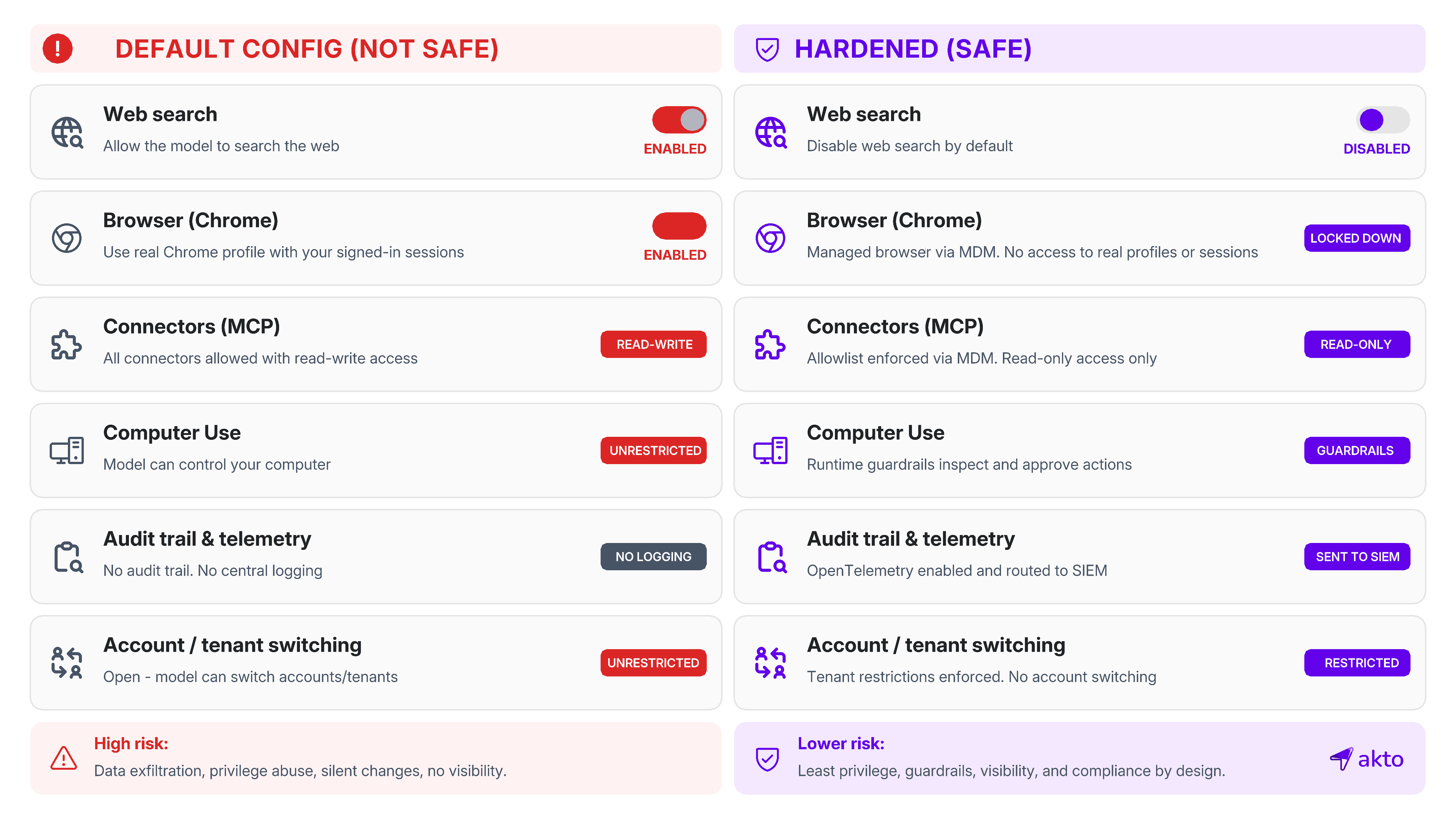
No single control eliminates these risks, least of all injection. The defensible posture is defense-in-depth aimed at shrinking what an attack can do:
Discover what you actually have first. You can't govern what you can't see. Before hardening anything, inventory every place Cowork (and other AI agents) is running, which connectors and MCP servers are attached, and what data and systems each can reach. Shadow deployments on personal accounts are exactly where the controls below don't apply.
Pick the right tier. Enterprise is the only plan with SSO, SCIM, RBAC, Chrome off by default, and tenant restrictions. Team ships permissive; Pro/Max offers no org controls.
Close the account-switching loophole. Inject the
anthropic-allowed-org-idsheader at a TLS-inspecting proxy so users can't bypass controls via a personal account.Lock settings before launch. Push
managed-settings.jsonvia MDM to disable bypass mode, deny credential-file reads, restrict mounts, and enforce the MCP allowlist.Default to least privilege. Disable web search unless needed, set connectors read-only, scope file access to a dedicated folder, and keep Computer Use and Dispatch off until justified.
Put runtime guardrails in the path. Static settings don't catch an injection mid-execution. This is what runtime guardrails are for. Inspect agent actions as they happen and block the dangerous ones (bulk file reads followed by external writes, connector sends to unknown destinations, connections to unapproved tool endpoints) rather than relying on after-the-fact log review.
Build your own detection. Route verbose OpenTelemetry to your SIEM; alert on scheduled-task creation, non-allowlisted MCP connections, connector writes, and sensitive-directory reads.
Cowork can be deployed safely, but the default configuration isn't safe. The teams getting it right treat it as privileged agent infrastructure from day one.

Experience enterprise-grade Agentic Security solution