How to Audit MCP Server Permissions for Enterprise AI Agents
Learn how to audit MCP server permissions for enterprise AI agents, identify excessive privileges, enforce least-privilege access, and reduce agentic AI security risks.

Rushali

AI agents are no longer responding to a question in a sandbox. They call internal API, read databases, move files, trigger actions in production systems, and they call through a Model Context Protocol server that provides access to those tools. Each of those connections is a permission, and most businesses don't have a clear idea of what their agents are actually able to access.
Risk resides in that space. An agent who has more authority than what he/she needs is a single point of failure if he/she is manipulated with a poisoned input. You fill in the gap by conducting an MCP Server Permissions Audit: a carefully planned review of what each agent is allowed to do, and why, as well as whether there are controls in place around this access. It's a basic principle of enterprise AI agent security. This guide explains the importance of these audits, the types of risks that they reveal, a six-step process that can be repeated and even a checklist that can be reused, and how to evolve from annual audits to continuous oversight.
Why MCP Permission Audits Matter for Enterprise AI Security
The Rise of MCP in Agentic AI Architectures
Because it allowed a single agent to connect to dozens of systems, using a common interface, the Model Context Protocol was adopted as the standard for agent-to-tool connectivity. Adoption leads to convenience, and convenience leads to sprawl. A typical enterprise now has several MCP servers, each serving up tools, APIs, and Data Sources to agents deployed by various teams at various times. But few organizations know what that web of connections looks like, which is key to MCP security.
How Excessive Permissions Increase AI Risk
An agent operates with whatever level of access it has and works on its own at machine speed. Give it wide access and give it a single "prompt injection," and its reach becomes damaging: Data extracted from systems it never intended to access, action taken far beyond its scope of intended use. Too many permissions will increase the radius of impact from any incident. This is constrained by the principle of least privilege, and not applying it is the most frequent deficiency in any MCP risk assessment.
The Compliance Impact of Uncontrolled Agent Access
The regulators and auditors are now requiring proof that AI systems are used within a certain framework. Uncontrolled agent access does not meet that test because you would have to prove control over something that you haven't inventoried. Documented, Justifiable, and Reviewable permissions are essential to MCP compliance. If they were not present, an audit is an exercise in trying to "tell it as it happened" afterward.
Understanding MCP Server Permissions
What Permissions Can AI Agents Receive?
The first step to securing MCP servers is to know exactly what it can be given. From the things an agent can call, whether it be a specific tool, a database, a read or write file, an external API, or another agent, AI agent permissions cover it all. Each permission is a permission that should correspond to a task that an agent performs. In practice, grants pile up far faster than anyone can remove them, leading to permission sprawl in the agent fleet.
MCP Authentication vs MCP Authorization
Authentication validates that the agent is connecting. That agent is authorized for what it can do when it connects, and that's determined by authorization. They are routinely confused, and that confusion can be dangerous – agents might be properly authenticated, and yet have much more authority than they are entitled to have. This audit focuses on the MCP authorization layer, as identity without scoped permissions is an open door with a name tag.
Common MCP Access Models
MCP servers have various types of access that each have a level of exposure:
Using the tool access permissions, an agent can invoke certain MCP tools. Broad tool authorization allows an agent to call functions that he or she shouldn't be calling.
API permissions give permission for calls to services that are internal or third-party, frequently including the agent's ability to act on behalf of a user.
Database permissions allow read or write access to records, and over-provisioning can allow regulated data to be exposed.
File system permissions allow agents to read, edit, or delete files, which can often lead to unintentional data loss.
External service permissions enable agents to connect to SaaS platforms and cloud resources, making the AI agent access control challenge a problem that goes beyond your perimeter.
Security Risks Associated with MCP Permissions
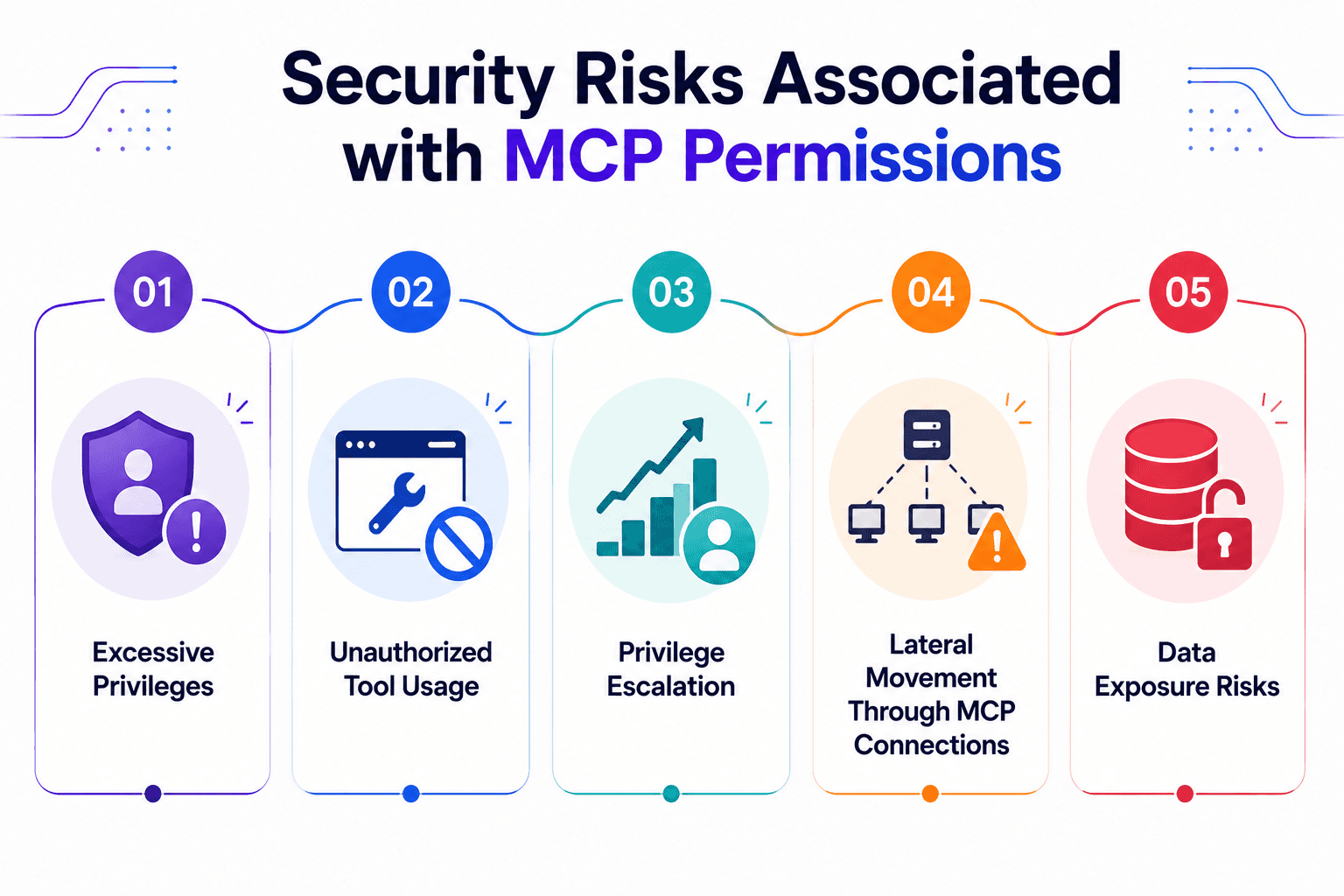
Excessive Privileges
The biggest risk is that of over-provisioning. Usually, agents are given very broad access to a site to minimize potential friction, and then the access is never reduced. An overprivileged agent is a burden that silently grows, for nothing breaks until something does.
Unauthorized Tool Usage
If tool authorization is lax, an agent can manipulate or have buggy logic that allows it to invoke tools that are not supposed to be invoked. An agent in a customer-support role who can access a deployment tool is a problem that is waiting to happen.
Privilege Escalation
Privilege escalation occurs when an agent acquires rights that are higher than those the administrator intended to give the agent, typically by chaining calls of tools or exploiting a service account that is granted too many permissions. An agent can bootstrap its way into much greater access than intended by modifying its configuration, or by asking for new grants.
Lateral Movement Through MCP Connections
The agents, tools, and systems connected with MCP servers are designed to communicate with each other, and thus a compromise is seldom contained. If an attacker gains control of one agent, he can hop through the connections to other agents – taking advantage of the fact that they have valid permissions and bypassing common security alarms.
Data Exposure Risks
The agents are regularly dealing with sensitive information. When databases and files have broad permissions and services can be called outside the boundary, there are opportunities for data to escape where it doesn't belong. When data is exposed via an agent, it appears to be a normal operation, making it dangerous.
Signs Your MCP Environment Needs a Permission Audit
If you're unsure, here are some signs to look for that your MCP environment might need a permission audit.
Uncatalogued unknown MCP servers on employee machines and/or cloud accounts.
Multiple agents sharing the same credentials, making it impossible to hold an agent accountable and to establish a clean mapping of an agent to an action.
Permission of broad tool access (agents have access to a lot more tools than they need for their role).
Permissions that have not been revoked and are left unused because they may have been granted for a previous use.
No approval workflows - new grants are created spontaneously without any evidence of who gave them approval.
Lack of audit trails, which makes it impossible to be able to determine what an agent performed or when an agent's access to the data changed.
If more than two of these are true, an audit is due.
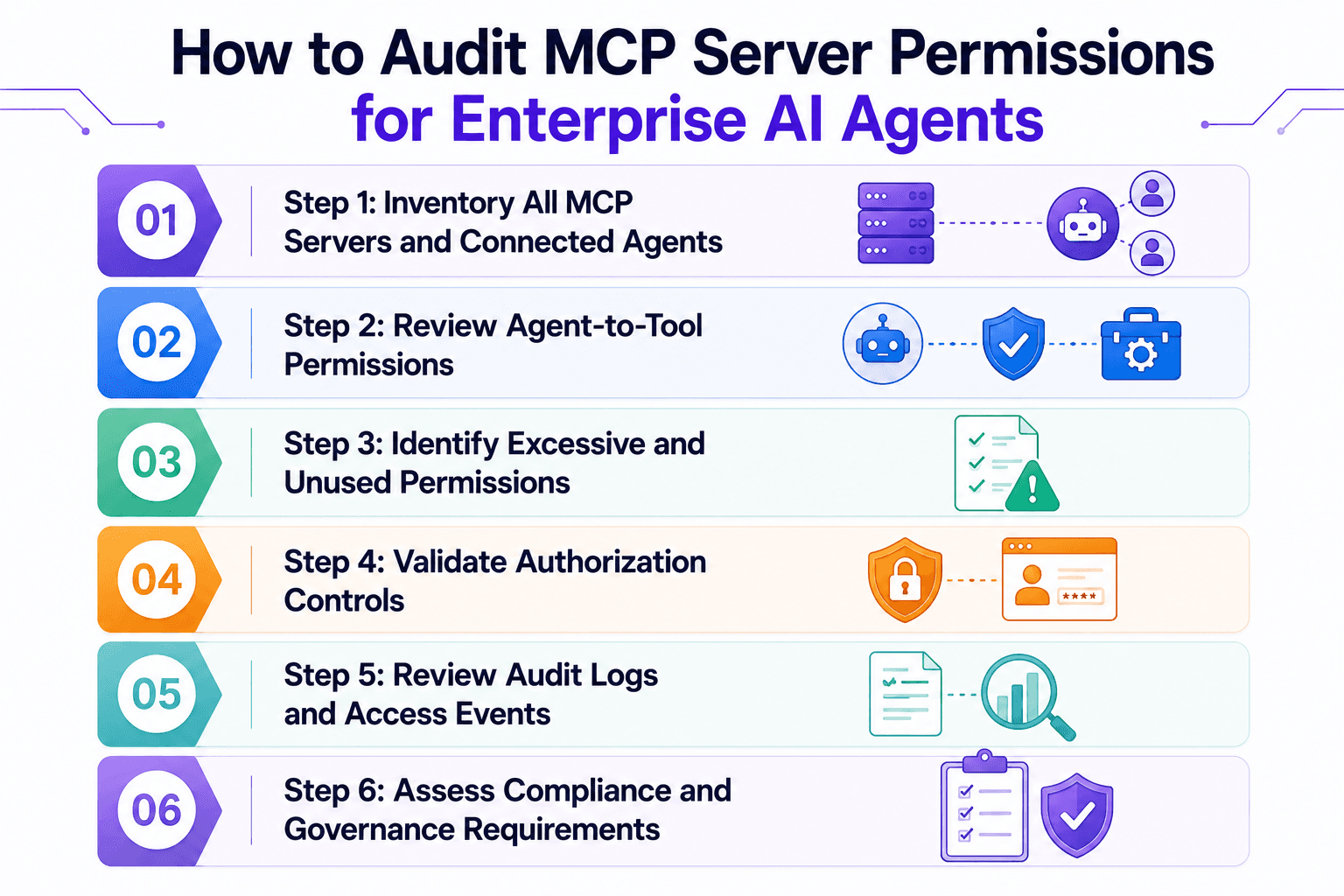
Step 1: Inventory All MCP Servers and Connected Agents
Discover Active MCP Servers
It's impossible to audit what you can't see. First of all, find all MCP servers, even those deployed by teams without the knowledge of security. Because the worst surprises lie in the shadow MCP servers, scan cloud accounts and employee endpoints, plus on-premises infrastructure.
Identify Connected AI Agents
For each server, list the agents that are attached to it. Take a snapshot of each agent's owner, purpose, and who it authenticates with. This is where the shared service accounts are also evident, as one credential for multiple agents becomes apparent upon deliberate mapping of identities.
Map Tool and Data Access Relationships
Identify which tools, APIs, databases, and other external services are exposed by each server, and which agents are able to access them. As a result, you will get a connected map of dependencies and access paths instead of a flat list.
Deliverable: Inventory of MCP assets. A record of each server, agent, tool, and data source, including owner and access. All that follows relies on this artifact and its accuracy.
Step 2: Review Agent-to-Tool Permissions
Which Agents Can Access Which Tools?
Having the inventory created, clearly outline the agent-to-tool grants. Over-provisioning becomes evident by a glance at a permissions matrix:
Agent | CRM Tool | Payment API | Prod Database | File Storage | Deploy Tool |
Support Bot | Read | None | Read (tickets) | None | None |
Billing Agent | Read | Read/Write | Read/Write | Read | None |
DevOps Agent | None | None | Read | Read/Write | Execute |
Analytics Agent | Read | None | Read | Read | None |
Rows that light up across many columns are your first candidates for review.
Are Permissions Business Justified?
Ask for each grant: if there is an existing task, does it need this grant? A permission denied to anyone is a permission to remove. The distinction between necessary and accumulated cruft is determined by business justification.
Are Sensitive Tools Properly Restricted?
Look for high-impact tools – anything that involves payment, production data, deletion or deployment. These should be the most tightly guarded combinations of tools and the most clearly divided uses of them – no one should have both the right to read the customer's information and to move the money.
Step 3: Identify Excessive and Unused Permissions
Detect Overprivileged Agents
Analyze each agent's permissions granted and compare them to its permissions used. The agents who have more rights than observed are overprivileged and need to be scoped down. This comparison is the real essence of implementing least privilege.
Find Dormant Access Rights
If a permission hasn't been used for months, it becomes dormant and may be risky without any advantage. Any unused access should be viewed as a bug to be fixed, not a feature to be maintained. Don't use what you don't need.
Review Legacy MCP Integrations
Older integrations tend to have the widest and least-documented access, based on earlier practices of a looser nature. Revisit all legacy connections, ensure they are still required, and re-scope/replace or retire connections. A frequent cause of too much permission is legacy grants.
Step 4: Validate Authorization Controls
Role-Based Access Controls (RBAC)
Permissions are assigned to roles, not agents, making grants consistent and reviewable. Ensure that your MCP authorization is actually a role and not granting specific permissions to every specific agent. RBAC is the starting point that every enterprise should go and achieve first.
Attribute-Based Access Controls (ABAC)
Attribute-based access control is an extension of RBAC that considers attributes such as data sensitivity, agent type, environment, etc. An agent may be running under staging and not under production due to attributes that have been evaluated at request time. ABAC provides finer control when roles are too coarse.
Context-Aware Authorization Policies
The best controls are real-time context: origin of the request, risk of what action is being taken, recent activity, and the data being accessed. Context-aware authorization can deny a request that is normal on its own but anomalous when viewed in the context of previous requests; that is the exact sequence a compromised agent can catch a request.
Step 5: Review Audit Logs and Access Events
Monitor Tool Usage
If no one reads the audit log, it's of no use! Check tool invocation logs to see agents are invoking what they should and not more. An unexpected pattern of calls to tools is an early indicator of misuse or compromise.
Track Permission Changes
The granting, revocation, and role change should be recorded with the individual's name and the date of the activity. A change history is a clear history that allows you to respond to an auditor's questions and track the path by which an agent acquired the access it has.
Detect Anomalous Access Patterns
Any behaviors that run outside of the standard patterns of an agent need to be investigated. Review some key metrics:
Frequency of tool invocation (i.e., a sudden increase in the number of times a tool is invoked may mean that it is running "out of hand" or that it is being abused).
Failed attempts to authorize, frequently indicating that someone is attempting to log on to something that they don't have the authorization for.
Actions that pose a risk, such as financial transactions, bulk data reads and deletion, should be checked each time.
Step 6: Assess Compliance and Governance Requirements
NIST AI RMF
The NIST AI Risk Management Framework consists of four functions: govern, map, measure, manage. Your permission inventory and review map aligns directly with its map and measure activities, providing quantitative evidence of the understanding and control of access.
ISO 42001
ISO/IEC 42001 is a management system for AI that's based on repeatable processes. The standard expects permission reviews and approvals to be documented and follow a workflow process; all of your audit artifacts are proof that it works.
EU AI Act
The EU AI Act imposes more stringent requirements on high-risk systems, such as transparency and human oversight. Those obligations are met in the case of high-risk agents by the presence of scoped and reviewable agent permissions.
Internal Governance Policies
Most organizations specify additional rules, in addition to the external rules. Permission reviews convert those policies into compliance requirements that create the necessary compliance documentation that will connect each grant to an approved compliance standard.
MCP Permission Audit Checklist
Please use this checklist for a thorough review and to establish a recurring schedule:
Identify and list all MCP servers (even shadow deployments)
List all AI agents and who they are.
Assign permissions for tools in a matrix. Set up permissions for tools from agent to tool.
Recognize overly privileged access to existing uses
Clean up unused and dormant permissions
Discuss and review authorization controls (RBAC, ABAC, context-aware).
Allow the audit log to span across servers and agents.
Set up approval procedures for new grants.
Perform regular access audits on a regular basis
Include evidence of compliance for each to which you are accountable
How do you audit MCP server permissions?
To audit MCP server permissions, inventory all MCP servers and connected agents, map access rights, identify unnecessary permissions, review authorization controls, analyze audit logs, and implement continuous monitoring.
Common MCP Permission Audit Findings
Shared Service Accounts
The most common occurrence (and the one that eats through the most) is multiple agents with one service account. It eliminates accountability – you can't find out who did what. An agent identity must be scoped for each agent.
Excessive Database Access
Users are often given access to the entire database when they require access to a few tables. When an agent requires access to a few tables, he or she is typically given access to the entire database. The all-pervasive read and write access to production data is a minor compromise that becomes a major breach. Records in the Scope database are granted access rights by the specific task that requires them.
Unrestricted Tool Invocation
There are agents that are consistently discovered during audit that are able to invoke any tool on a server without any limits or restrictions. When the word unrestricted is added to the word invocation, then a manipulated agent can go the extra mile. Tool access should NOT be set as default; it should be allow-listed.
Missing Approval Controls
No record of intent, no opportunity to catch bad grant prior to shipping, permissions granted without an approval step. The reason that permission sprawl speeds up is that workflows are missing. Permission sprawl speeds up because workflows are missing.
Lack of Logging
Many environments do not have the ability to recover agent activity, as it is never logged or is never kept. You would have a blind man's fortune if you didn't have audit logging, because at the time of need, incident response and compliance reporting fail to go.
Best Practices for Securing MCP Permissions
Apply Least Privilege
Give the least access an agent needs to accomplish its task and no more. Least privilege is the most effective control, as it reduces the impact of a compromised agent.
Use Just-in-Time Access
Don't allow elevated privileges to stand; allow only use when necessary and revoke them automatically. Just-in-time access eliminates the dormant rights that audits find because access that does not remain dormant can't accumulate.
Implement Continuous Permission Reviews
Perform access reviews on an ongoing basis based on changes in agents and tools, rather than once a year. Regular reviews maintain a manageable difference between the granted and required access.
Monitor High-Risk Actions
Inspect activities that may cause actual damage: bulk access to data, deletion of data, financial data transactions, and configuration changes. If these alerts are triggered, security may have time to respond before an action has taken place.
Automate Access Governance
Manual reviews cannot scale with the increasing number of agents. To achieve least privilege at enterprise scale, and not just as a one-shot deal, is possible only through the automation of access governance: discovery, review, revocation.
Continuous MCP Permission Monitoring vs Annual Audits
A point-in-time audit is one time, and an agent environment is not static. New agents come in every week, tools are added, prompts change, and permissions are lost between reviews. An annual audit, signed at the end of January, doesn't mention any access an agent gained in March.
This situation is exacerbated by the use of autonomous agents, since how they use their tools depends on the task they are handling, and the task could require new grants. Continuous monitoring shortens the interval between reviews to see permissions that might be excessive or access that's out of the ordinary, rather than months later. An ongoing oversight model is the only model that keeps up with the pace of change for agentic systems. Static reviews can still be a necessary step for formal sign-off, but cannot be a primary control.
How Automated Security Testing Improves MCP Permission Audits
These audits are not easily done by hand for more than a few agents. It's automated security testing that makes the process continuous and complete, and a purpose-built platform makes the results directly actionable. Akto was one of the first dedicated MCP security solutions and was recognized as a representative vendor for AI agent security by Gartner.
Discovering Hidden MCP Servers
Akto detects and catalogs MCP servers, AI agents, tools, and resources on cloud infrastructure and across employee endpoints – even those manual inventories are missing. With continuous discovery, the asset inventory is always up to date and accurate as the environment evolves.
Identifying Authorization Weaknesses
MCP servers and agents are automatically targeted by Akto's Agent Probe, which simulates an attack, such as prompt injection and object poisoning, to reveal where authorization fails. This testing identifies missing links in the permissions to what a bad guy can do.
Detecting Privilege Escalation Paths
This mapping of agents, tools, and their relationships, plus lineage tracking, reveals chains where an agent may escalate privileges or move laterally. A permissions matrix becomes a true risk picture when you're able to see these paths before an attacker is able to.
Validating Access Controls Continuously
Akto applies guardrails via an agentic proxy for MCPs and agents using least-privilege controls and denying risky actions before being executed. Combined with runtime enforcement, continuous testing ensures that access controls are not just paper-based, but valid in practice.
Building a Governance Program for MCP Access Management
If you're successful, the permissions are hardened once. A governance program helps to keep them that way. High-quality, effective governance of mature MCPs is built on five elements:
Ownership: Give someone clear ownership of MCP access governance, who is responsible for the list of resources, when they're reviewed, and the policy. If there is no named ownership, the audits become a one-off project that fades away.
Review cycles: Specify frequency and frequency of off-cycle review of agents, tools, and grants when agents or integrations change.
Policy enforcement: Make least privilege, separation of duties, and approvals as enforced policies and controls, not as guidelines; preferably checked automatically.
Compliance reporting: Map permissions to NIST AI RMF, ISO 42001, EU AI Act and internal standards and provide it to an auditor in case of a fire drill.
Continuous monitoring: Bring live discovery, usage and anomaly data back into the program, making it a true representation of the environment, and not just what it was last quarter.
Run together, these make AI agent privilege management into an ongoing capability.
Final Thoughts on Audit MCP Server Permissions
One way enterprises prevent autonomous agents from becoming the biggest unmanaged risk is to audit what they can and what they can't do on the MCP servers. The work is real: audit what is there, know what each agent can access, narrow access down to what is needed to be done, test access, and monitor the logs. It is not done every year, but it's done on an ongoing basis; it involves the least amount of privilege.
Akto automates that continuous process by automatically identifying MCP servers and agents, AI red teaming them for authorization vulnerabilities, mapping privilege escalation paths, and setting runtime guardrails. Transforms manual audit and security into an ongoing and agentic security capability. To see how it enhances your MCP and agent permissions, book AI Agent Security demo.

Experience enterprise-grade Agentic Security solution