Shadow AI Detection for Enterprise AI Security
How shadow AI detection actually works - network, browser, and OAuth signals fused together, what each one misses, and where to start with 30 days of logs.

Rushali

If you aren't sure what shadow AI is and how it differs from shadow IT, this overview of shadow AI is a good place to start; the same article also explains how to create the governance program when you discover something to review. It's a story about the things that precede both: the AI tools, agents, and browser extensions that are already running within your organization, few of which are even known of, let alone approved by security teams. None of the instruments detect it all. CASBs lack the browser tab. That's because the free tier tool isn't being logged into by anyone with a company account. The OAuth grant will continue to operate after everyone has forgotten about it, and endpoint tools will not be able to detect it. Real shadow AI detection programs combine at least 3 types of signals: network, identity, and endpoint, since none of them sees the whole picture.
Why Single-Signal Detection Fails
If you ask five security teams for a first step in addressing shadow AI, you’ll receive five different answers: a CASB report, an SSO app catalog, a SaaS spend audit, a SIEM alert, and so on, and each of those answers will be only part of the story. Access security companies observe authorized SaaS traffic with a previously known set of APIs, and they don't have access to personal ChatGPT accounts on a home WiFi, or an OAuth token a marketing tool sneaks from Google Drive. While SSO logs are good at documenting when an employee intentionally logs into an app via the identity provider, they don't provide any info about a browser add-on that was installed without ever logging into SSO, or a coding assistant that was signed up with a personal email address. SaaS management platforms monitor spend on licenses and app catalogs – they don't monitor anything that wasn't paid for, and most of the consumer-driven AI offerings are free to get started, meaning that most of the shadow AI offerings aren't covered by any of these platforms.
The trend overall is the same for all three gaps: all the approaches make assumptions that the sign of AI adoption will be present in the channel where they were developed. Shadow AI, on the other hand, does not adhere to that assumption. That's why any real shadow AI detection tool doesn't rely on network, ID, or endpoint signals, it is an input, not the sole input.
Network-Layer Detection
Typically, a team's initial alert of potential shadow AI network detection will be from network telemetry, as DNS resolvers, web proxies, and CASBs are already in the path of traffic for most managed devices. The following sections describe what that telemetry does, the importance of keeping that domain list up-to-date, and where the network layer becomes useful.
DNS Logs, Web Proxy Data, and CASB Records
The most economical, comprehensive baseline is DNS logs AI detection: they're available for every device that resolves a domain, such as claude.ai or openai.com, no matter whether they were proxied or not. So, the problem is that DNS indicates whether a domain was queried instead of what happened after, such as no prompt content, and no detection of user-to-device mapping on networks using shared NAT. Web proxy AI traffic analysis fills part of that gap: A proxy that terminates TLS can log fully, and sometimes it can tell the difference between a marketing page visit and an active prompt submission, logging full URL, method, and payload size. CASB shadow AI monitoring is a third layer for AI tools with a documented API - AI tools that are embedded in SaaS can be monitored for compliance with policy, and anomalous data volumes can be flagged by CASBs, but only for the platforms they are set up to monitor.
Why the AI Domain List Has to Be Treated as a Live Threat Feed
A known AI domain list is only useful as long as it is still up to date, and new AI products are being released every week: New model providers, coding assistants, browser agents, and a myriad of boxed products derived from a handful of foundation models. The list created in January lacks a significant portion of what employees use by summer. The most common cause of network detection gradually slipping away in the background over the course of months is to consider it a one-time configuration item. It requires the same operational treatment as a threat intel feed: cadence for updates, a source that is able to keep track of new AI releases, and the ability to backfill historical logs if a domain happens to be added to the feed; otherwise, one tool that has been sitting quietly for three months doesn't suddenly start showing up today.
What Network Detection Misses
Network visibility stops at the edge of the network that's being watched. A personal laptop on home Wi-Fi, a phone on cellular data, or an unenrolled device belonging to a contractor is invisible to both DNS logs and CASBs and does not require a VPN to access an AI tool via the web. As more and more AI tools are being released as native applications instead of browser experiences, non-proxied and encrypted traffic also evades the managed device's proxy inspection capabilities. Most of all, network telemetry reveals that a connection has taken place, but not its contents: it cannot determine, for instance, whether a message was a customer's data or a request for the forecast for tomorrow. The gap is why network detection needs to go hand-in-hand with signals nearer to identity and the endpoint, as detailed next.
OAuth and SSO Grant Scanning
Network telemetry can tell you where traffic is going, but it can't tell you what an authorized employee did once it arrived. By examining the extent of permissions that employees grant when they click “Continue with Google” or “Continue with Microsoft”, often the most impactful shadow AI signal, OAuth grant scanning helps fill that gap.
Why a Single Click Can Create a Permanent Data-Access Grant
After the employee clicks 'Continue with Google' on the new AI tool, the consent screen that appears lists scopes that not many people read carefully: read your email, view your files, see your calendar. It does not necessarily log the employee into a session; it issues an OAuth token that can continue to work without any login or continued use of the product. The risk of OAuth access for most exposure of shadow AI is persistent: the grant persists through password resets, employees forgetting the tool exists, and many cases where the employee leaves the company without ever revoking it. Each standing grant is, in fact, a non-human identity, and every non-human identity detection was never a goal of human identity programs.
Auditing Google Workspace, M365, Slack, and GitHub Grants
The hands-on version of this is SSO App Enumeration on all platforms that issue OAuth grants, not only the identity provider. API controls in the Google Workspace's admin console show all third-party apps that have domain-wide or individual access along with the exact scope. Under enterprise applications, there is a similar view in the Microsoft 365 admin center, which distinguishes delegated permissions from application permissions; application permissions typically aren't tied to the individual who remains active. The four platforms where most enterprise AI integration requests for access include Slack's app directory and GitHub's OAuth Apps and installed GitHub Apps settings. The audit is less an app counting affair, and more a scope reading affair: Read-only calendar access is a different risk than full Drive read/write access, and possibly must be done on a schedule, not once, with new grants coming out all the time.
Browser and Endpoint Telemetry
OAuth grants are indications of what employees authorized, not what employees actually type into a prompt box day to day. Most enterprises have the least visibility into the layer of telemetry that's closest to the risk: Browser and endpoint.
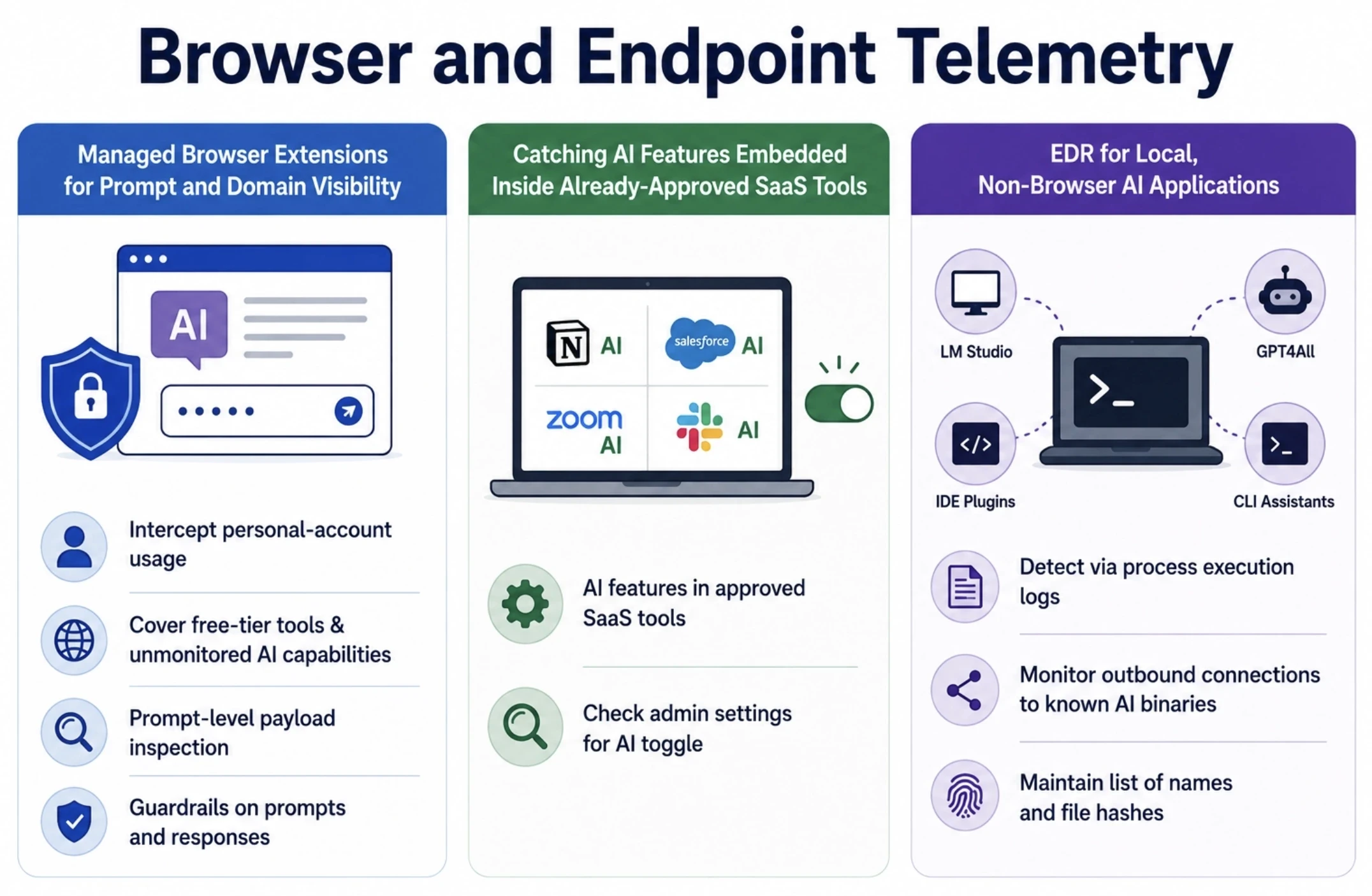
Managed Browser Extensions for Prompt and Domain Visibility
MDM browser extension AI monitoring provides security teams with visibility that DNS and CASB can't provide – into page content, not just the domain visited. That's where shadow AI browser extension monitoring comes in handy: It can intercept personal-account usage of approved tools, free-tier tools that don't connect to a CASB-monitored API, and AI capabilities added to sites that aren't AI products. Prompt-level payload inspection, where you can scan text you're typing or pasting for source code, credentials, or regulated data, is what sets an extension that logs "user visited claude.ai" apart from one that identifies a block of customer data pasted into it. Akto's Atlas browser extensions put guardrails on prompts and responses in web-based AI tools at composition time instead of just logging a visit.
Catching AI Features Embedded Inside Already-Approved SaaS Tools
Exposure to these highest-risk tools can actually be an old platform, bundled with an approved, pre-existing SaaS AI feature. The AI functionality is often not reviewed in its own right, since it's integrated into a tool that passed the procurement process, such as Notion AI, Einstein of Salesforce, Zoom's AI Companion, or Slack AI. It is typically turned on by default or by one click using the admin setting and will process any data the base application has access to. To catch this, it requires explicitly checking the admin settings of each approved platform for the AI toggle and not assuming an older security review account for a capability that was added 18 months later.
EDR for Local, Non-Browser AI Applications
Not all AI tools run in the browser. EDR shadow AI detection is for locally installed applications, such as desktop applications like LM Studio or GPT4All, AI plugins in IDEs, and command-line coding assistants, which are not web pages. They bypass the browser-tab and CASB-visible traffic that other layers depend on, but can be detected in process execution logs, and EDR agents deployed for endpoint security can be configured to monitor outbound connections to known AI binaries and unusual outbound connections from unknown processes. Much like the domain list at the network layer, the work is to compile a list of names and file hashes for typical local AI tools.
Detecting Local Agents and Shadow MCP Servers
Local AI agents and self-hosted MCP servers introduce a category endpoint and network tools weren't designed to view: a developer can download a model, connect it to a Model Context Protocol (MCP) server, and provide it with tool-calling permissions to access internal systems within the process space of a laptop, sometimes without it leaving through a corporate proxy. Shadow MCP server detection still needs to begin at the network layer, as these configurations leave behind a DNS fingerprint. One of the most common indications that a model was pulled down to a local file to be run locally instead of through a hosted API is a local model registry DNS lookup (query to huggingface.co, ollama.com, or some other model-hosting service). The second fingerprint is agent tunneling service detection: developers exposing a local MCP server or agent to a remote client will often resort to ngrok, Cloudflare Tunnel, or localtunnel, and a DNS query to one of those domains from a developer machine is a strong indicator that something is being exposed outside the intended boundary. A model registry lookup and tunneling connection from the same host is sufficient to trigger a model registry check pattern that is a good indicator of a shadow MCP server. For a deeper dive into the discovery of these servers once they are deployed, Akto's guide to MCP discovery, on-premises and employee endpoints covers the connector-based approach in greater detail and uses 50+ connectors to capture both documented and undocumented MCP servers.
Fusing the Signals: A Practical Detection Architecture
The design is to capture portions of the picture at each layer and exclude the others, since no single signal was designed to capture all of the picture. The important question is how much depth in each layer and what is the order of building these layers when starting from scratch.
Breadth vs. Depth: Network Telemetry vs. Payload Inspection
Network telemetry and payload inspection are polar opposites in a breadth vs depth tradeoff, and a mature program should have both. These logs are low fidelity (that a domain was reached and that's it), cheap (because they are already flowing from infrastructure most companies already have), and cover every device without installing new software. High fidelity payload inspection: irrespective of whether it's a browser extension reading the prompt content, or a CASB inspecting sanctioned API traffic, high fidelity means the ability to differentiate between an innocent prompt and one containing regulated data, only on the devices where a higher level of instrumentation is deployed. For most teams, the best approach is breadth first, depth second: Analyze network telemetry to determine an appropriate range to instrument AI usage, and then instrument segments on an endpoint level starting with the highest-risk segments of the network as determined by your analysis (engineering, finance sections).
A 30-90 Day Starting Workflow
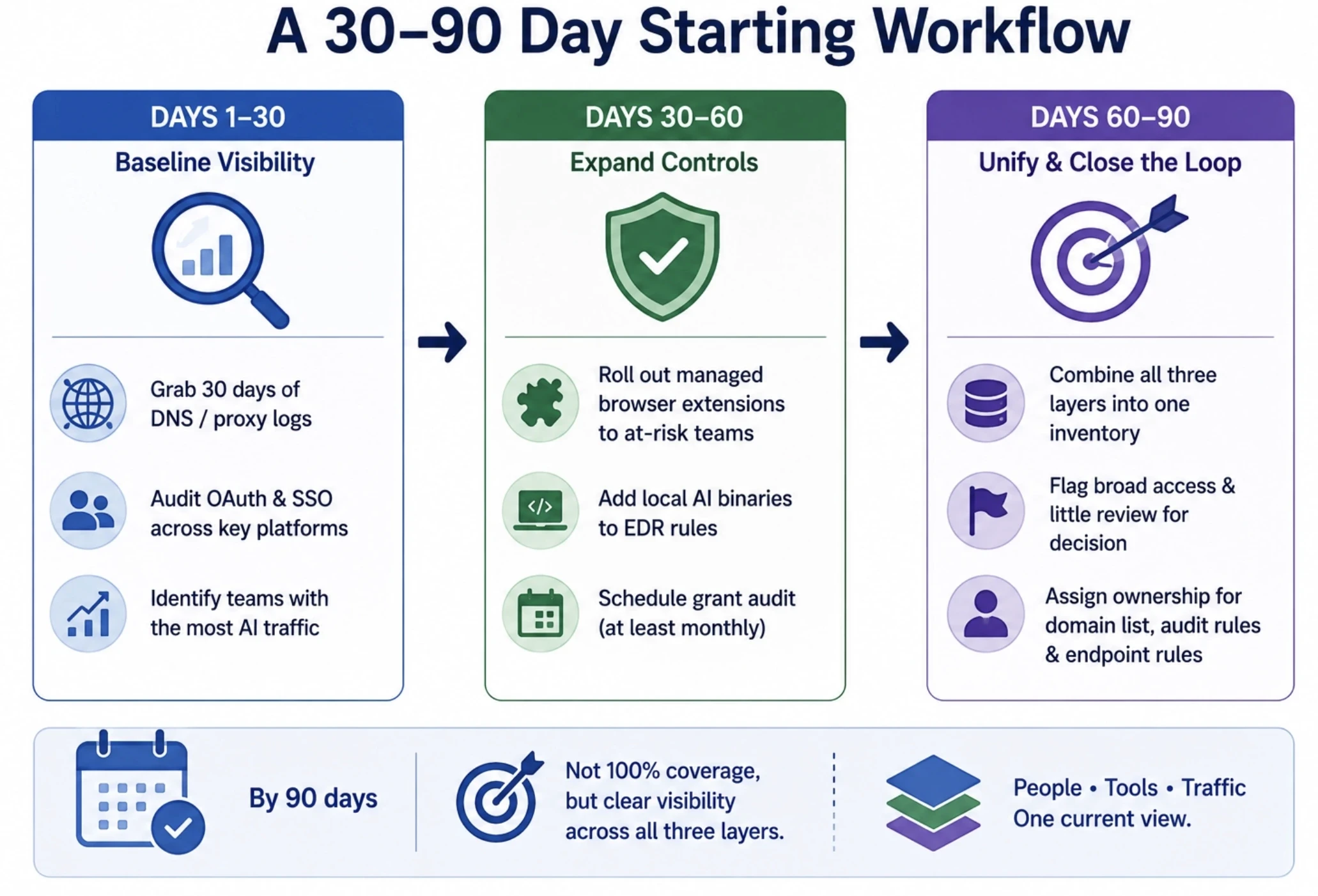
If you are a team with none of this in place, a realistic build-out takes place in three stages:
Days 1-30 - baseline visibility - grab 30-days of DNS / proxy logs from an existing AI domain list. Audit OAuth & SSO across Google Workspace, Microsoft 365, Slack, and GitHub. Determine the teams with the most AI traffic and focus on them next.
Roll out managed browser extensions to most at-risk teams (Days 30-60). Expand the list of known local AI binaries to be included in EDR rules. Schedule the grant audit to be conducted at regular intervals, at least monthly.
Combine all three route-finding layers into one inventory (rather than three spreadsheets) on Days 60-90, when it's time to close the loop in the world of policy. Use broad access and little review flagging to indicate for a formal decision. Ensure that someone is responsible for maintaining the domain list, audit rules, and endpoint rules, as each of these will expire without upkeep.
Ninety days won't give you 100% coverage, but it will give you a better picture in the middle: a current picture of all three layers.
The Compliance Angle: What Auditors Are Now Asking For
Three Common Criteria controls form the landing pad for some pointed questions from SOC 2 auditors about AI tools that may not have been mentioned 2 years ago. The "competence" criteria for the control environment, CC1.4, questions whether the organization has individuals who have the competency to understand and assess the risks the organization is actually experiencing and for AI, that is somebody who has a competency in AI risk, not just general IT security. CC6.1 is for logical access controls – and increasingly auditors view that as not only passwords, but also OAuth grants and API scopes that AI tools have to its company systems – a list of which AI tools have current standing access to a company's Workspace or M365 tenant is a real hole in the company's armor. CC9.2 covers vendor and business partner risk management, and as for free AI tools, they all work as if they were third parties to the employee's data, and the vendor wouldn't be subject to the risk management that normally happens. What auditors really want is an AI tool inventory audit: a list of all of the AI tools in use, who has approved them, what they can access, and how the list will be kept up to date between audits. A spreadsheet that is updated annually for audit season doesn't stand up to Type II testing that is done to see if the controls actually worked on the day the auditor was testing them.
From Detection to Governance
The difficulty lies in finding a shadow AI tool and the challenge of going further. Each finding from the layers above is ultimately assessed by one of three choices: approve the tool, provide an approved alternative that performs the same function, or deny the tool and explain the reason. The governance issues of who sees new findings, how fast, and what to do while they are being reviewed are a decision-making issue, not a detection issue, and are best designed, not figured out, the first time a risky tool is spotted. For more detail on this program-building exercise, there is our guide to shadow AI governance, which includes a discussion of providing alternative ways to do this that employees will choose over the shadow option.
How Akto Detects Shadow AI Across These Signal Layers
Akto sees shadow AI detection as a combination of problems, and this points to a similar layered approach as above. On the employee side, Akto Atlas provides managed browser extensions to add guardrails directly to prompts and responses within web-based AI tools; its MCP Endpoint Shield monitors local agent and MCP connections without requiring direct integration with the infrastructure of each AI vendor; and its IDE-level hooks add visibility to tools such as Cursor and Claude Code. On the infrastructure side, Akto Argus identifies AI agents, MCP servers, tools, and LLM endpoints in cloud environments and internal infrastructure, including shadow resources that are not formally inventoried, via over 50 connectors, which include agent builders, AI gateways and cloud platforms. Discovered activity (personal-account chatbot or an internally deployed chatbot talking to a cloud MCP server) comes back to one dashboard instead of three separate tools, and all guardrails Atlas makes are tracked back for monitoring and audit, the kind of ongoing proof a SOC 2 Type II observation period truly needs.
Final Thoughts on Shadow AI Detection
Shadow AI detection is not something you have to finish on a specific date; it is a way of doing work, as tools, OAuth grants, and local agents that your organization runs are constantly changing, regardless of whether or not someone is watching. Those teams who are on top of it are able to integrate network, identity, and endpoint inputs into a single, continuously updated view of the security landscape instead of conducting three separate audits and hoping the gaps don't overlap. You don't need to use three platforms anymore: Akto integrates that fusion into the same platform, Atlas for what's deployed on browsers and endpoints, Argus for what's deployed across cloud and internal infrastructure - and Akto's every guardrail decision is recorded back for monitoring and audit. If you are still creating this manually in a CASB and a manual OAuth audit in addition to a separate rule set in an EDR, book a Shadow AI demo and see how Akto maps it in one place.
FAQs: Shadow AI Detection for Enterprise AI Security
What is shadow AI detection, and how is it different from shadow AI governance?
Detection is finding AI tools, agents, and browser extensions already running without formal approval. Governance is what happens after - the policies and guardrails that turn what's found into something managed. Detection has to come first.
Why doesn't network-layer detection alone catch most shadow AI?
It only gets traffic from a monitored proxy or resolver. It does not include personal devices, unproxied encrypted traffic, one-time-only OAuth grants, or even prompt content.
What is OAuth grant scanning, and why is it considered the most critical detection signal?
It's a third-party access token check for new AI tools that employees use to “Continue with Google/Microsoft.” It's important because these grants remain alive regardless of whether someone logs in or not, and they can exist for a long time after they've forgotten that they were created.
How long does an OAuth grant to a third-party AI tool typically persist?
Until it is removed by a specific party. The difference between a token and a session cookie is that a token can still be used after the platform is disabled, after the user deletes it, or even after an admin removes it from their central system, and this can last for years.
What's the difference between network telemetry (breadth) and payload inspection (depth)?
Network telemetry (DNS, proxy, CASB) is all-encompassing and costs little, but only provides an indication that a connection occurred. Where payload inspection is actually deployed, it's much more accurate, but it requires reading the actual content.
How do you detect AI features embedded inside SaaS tools you've already approved?
Since AI features don't usually require a new security review for existing platforms, they should be audited as part of the admin settings that are already approved. It should be a periodic check and not an occasional check.
Can traditional CASB and SSO tools fully cover shadow AI detection on their own?
No. CASBs only see traffic to APIs they're configured to monitor, and SSO logs only capture apps employees deliberately connected through the identity provider. Both miss free-tier tools and personal-account usage.
How do you detect shadow MCP servers or locally-run AI agents specifically?
The pattern of looking up a model registry, such as Hugging Face or Ollama, and then connecting to a tunneling service, such as ngrok, from the same host is a reliable one to alert on, primarily through DNS fingerprints.
What's a practical first step for a team with no existing shadow AI detection in place?
Download and download 30 days of current DNS and proxy logs and audit for 30 days of existing OAuth and SSO grants in Google Workspace, Microsoft 365, Slack, and GitHub. Both require infrastructure that exists in most teams.
Which SOC 2 controls does shadow AI typically violate?
The most frequently encountered CCs are CC1.4 (competence to evaluate AI-specific risk), CC6.1 (logical access, extended to OAuth grants held by AI tools), and CC9.2 (vendor risk management, since unvetted AI tools act as unassessed third parties).
How does Akto fuse network, browser, and OAuth signals to detect shadow AI?
Akto Atlas manages both browser extensions and an MCP Endpoint Shield on the employee device user's browser to provide visibility of the browser and local agent on the employees' device, and discovers agents, MCP servers, and LLM endpoints across cloud infrastructure, all via 50+ connectors uploaded to one dashboard.

Experience enterprise-grade Agentic Security solution