OpenClaw AI Agent Security Risks: Technical Deep Dive and Modern Defenses
Explore OpenClaw's key security risks-prompt injection, malicious skills, exposed instances-and the modern defenses needed to secure agentic AI.

Rushali
In a few months, OpenClaw has grown into one of the fastest-growing open source repositories in the history of GitHub from a weekend side project. Named Clawdbot and later Moltbot, this self-propelled AI persona developed by Peter Steinberger can read your emails, perform shell commands, navigate the internet, and even interact with all aspects of your online world from one chat window. It is this same power that makes OpenClaw AI agent security threats so grave. Dozens of CVEs have been documented, numerous large-scale malicious skill campaigns on the community marketplace, and live demonstrations of attackers extracting private keys with just a maliciously crafted email. The article explores the actual nature of OpenClaw, how it adds to the attack surface, some of the vulnerabilities and incidents that have occurred in the first year of its existence, and the manual and automated ways to defend it.
What is OpenClaw? Agentic AI in Practice
But what is OpenClaw, anyway? It's an open source, autonomous AI agent you can use without paying anything, and it resides on your own hardware and interfaces with regular messaging apps such as WhatsApp, Telegram, Slack, Discord, and iMessage. While a chatbot can simply respond to a question, OpenClaw can be built to take action. It can handle a calendar, triage, send and receive email, browse the web, perform shell commands, and automate multi-step workflows on a person's behalf, all in plain-language chat.
The project started in November 2025, as a personal project developed by the founder of PSPDFKit, Austrian developer Peter Steinberger. It was originally built with Anthropic's Claude model, hence its name Clawdbot. The project was initially called Moltbot, but following a trademark dispute with Anthropic, it was renamed OpenClaw, its current name. Its mascot is a lobster, and it became one of the most discussed tools in AI in its first two months due in part to its explosion in popularity thanks to the AI agent social network Moltbook.
OpenClaw vs. Traditional LLMs and Automation
Text generation using a standard LLM chat interface. OpenClaw and agents such as OpenClaw do more. They run code, edit files, call APIs and talk directly to other systems. This means that any response given by OpenClaw is like a backend service with actual operational permissions would respond, rather than just a conversational response. It also has persistent memory between sessions, stored locally in files, allowing it to remember past interactions over weeks and react to hyper-personalised context instead of restarting from scratch with each message.
Skill Ecosystem and Third-Party Integrations
The majority of OpenClaw's flexibility is provided by skills, which are small units of instructions and code which teach the agent new skills. OpenClaw may be linked to a trading platform, a project management tool, or a video summarizer and other skills. Skills are shared in ClawHub, the project's community marketplace, and can include setup scripts with their instructions, making them indistinguishable from documentation and software. That is quite significant when you think about who can publish a skill and what it can do when it's installed.
The Expanding Attack Surface: How OpenClaw Changes Security Models
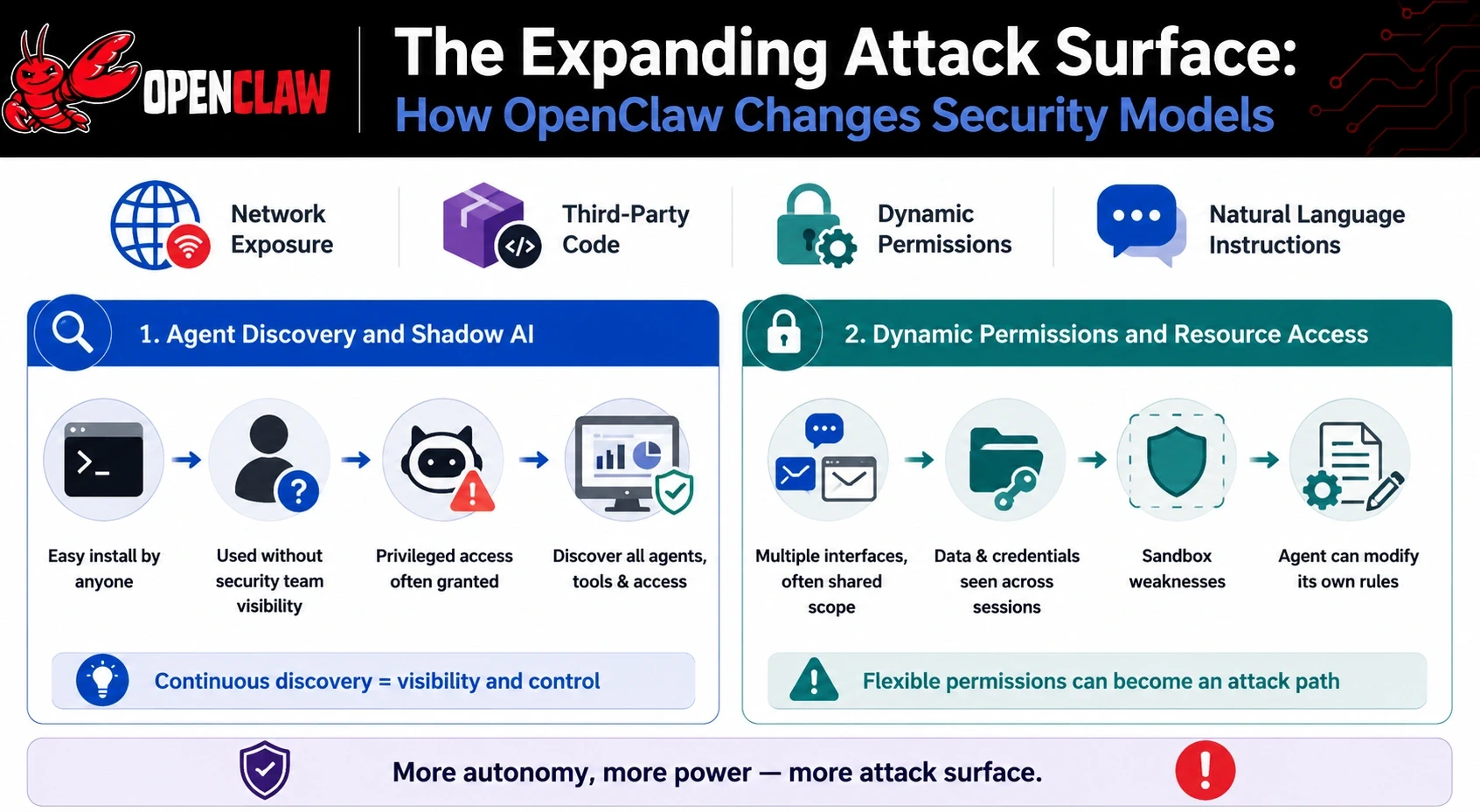
Traditional security models are based on the assumption that software takes human-initiated decisions explicitly. That is the challenge and what's exciting about agentic tools: how they redefine AI agent threat surfaces. Its OpenClaw attack surface includes network exposure, third-party code, dynamic permissions and the natural language instructions the agent reads and then executes daily.
Agent Discovery and Shadow AI
OpenClaw's install process is touted as being a single terminal command, and was easy for individual employees to execute on their personal or work machines without the security team knowing about it. The security researchers found that a high percentage of enterprise users were actively using OpenClaw or its forerunners, with privileged access commonly being granted without going through any formal process. That's the typical “shadow AI” pattern. Security teams weren't responsible for deploying the tool, and they didn't receive any visibility into the agents, data they accessed or permissions they possessed. That's what platforms for agentic AI discovery, like Akto, are meant to address by constantly mapping all AI agents, LLMs, and MCP tools deployed in an organization's infrastructure and employee devices.
Dynamic Permissions and Resource Access
OpenClaw's permission model is designed to be flexible, and flexibility is the problem. Direct messages, group chats and the browser-based Control UI all have distinct scopes, although many deployments are configured to use a shared scope, so that credentials and files from a conversation can be seen by another conversation. Reliable gaps in sessions have allowed information written in one chat platform to be read back in another entirely separate chat platform. There are also some weaknesses in sandbox enforcement. They observed that if a sandboxed session called a new child session, not all of the restrictions would be transferred to the child session, allowing a compromised agent to evade the sandbox by invoking its own multi-agent tools. The rules that restrict what a system call and/or file an agent can interact with are typically embedded in a configuration file that the agent can modify, so a successful prompt injection need not escape the sandbox. It can simply edit the rules it defines.
Core OpenClaw Security Risks: Real-World Threats
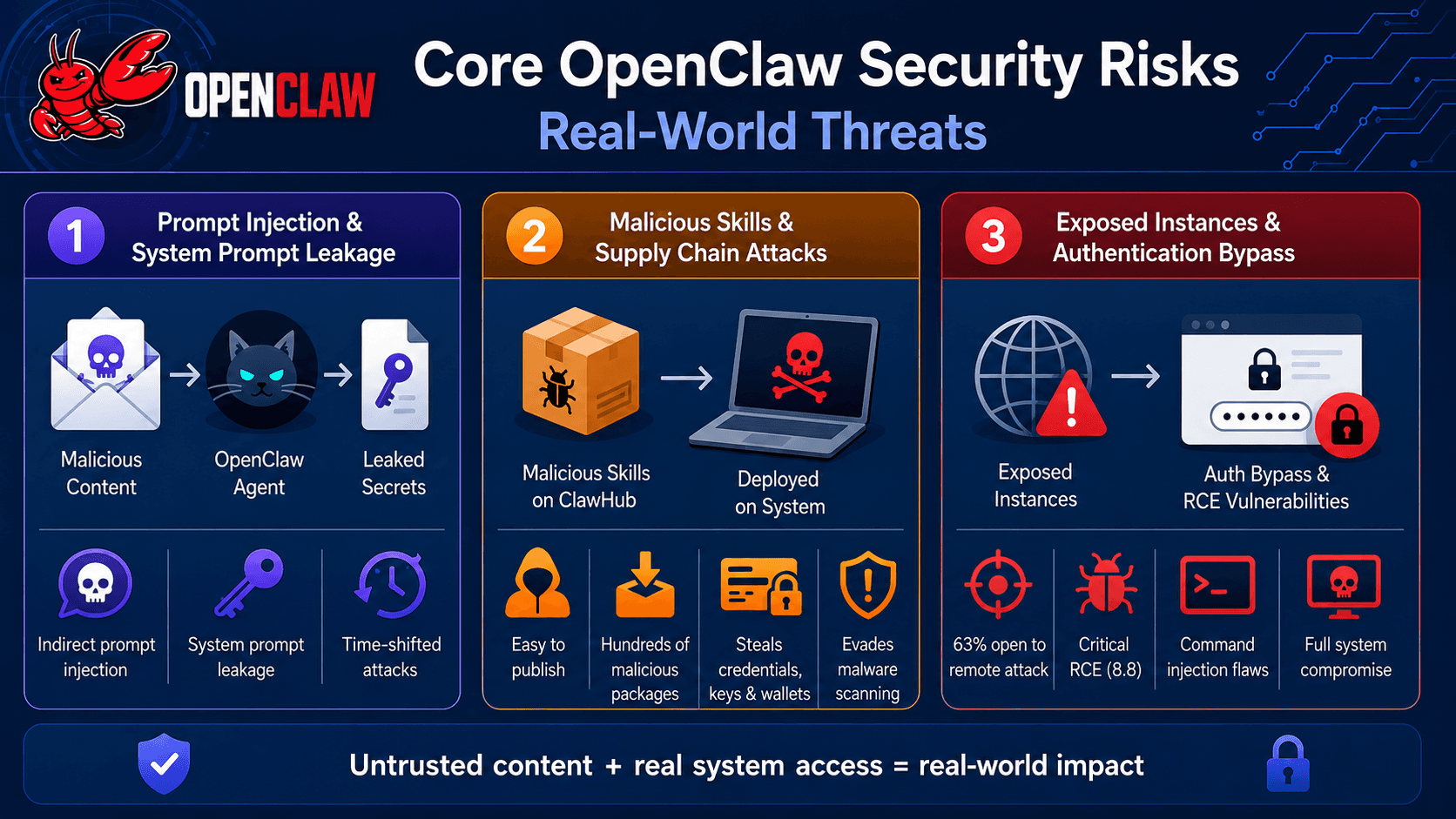
All the security risks reported since the OpenClaw launch have been real. They range from documented OpenClaw vulnerabilities and live demos to a coordinated malware attack, and illustrate the results of reading content that is not fully trusted by the agent with real system privileges.
Prompt Injection and System Prompt Leakage
The agent is the first place to look at when it comes to prompt injection in OpenClaw. Indirect prompt injection is a technique used to embed malicious instructions within content that the agent is supposed to process in some way, such as an e-mail message, a document, or a web page, without sending them as part of the content. The agent can end up thinking the attacker's text as a legitimate command as it is written in a flat file in the context window, with no reliable marker about the origin of the text.
The most obvious was provided by Matvey Kukuy, CEO of Archestra.AI, who sent an email containing a prompt injection to an inbox associated with his OpenClaw account, and just requested that the agent read his emails. The agent gave the private SSH key to the machine, and there was no malware or privilege escalation needed, within approximately five minutes. Separate research found another system prompt leakage failure mode, in which an email sent via a prompt could be used to cause OpenClaw to disclose its configuration file, giving its stored API keys and gateway authentication token. However, since OpenClaw also keeps persistent memory stored in local files, malicious payloads can be planted one day and activated days later if the agent's internal state aligns, researchers say, a technique they call time-shifted prompt injection.
Malicious or Unvetted Skills and Supply Chain Attacks
It is becoming one of the most common vectors of the supply chain and ClawHub is a textbook case of malicious skills in AI agents. It was extremely easy to publish on it; at one point, it only needed a GitHub account that was only a week old, which made it fertile ground for AI agent supply chain risks. Security researchers discovered a massive botnet that uses the name ClawHavoc, which hid malicious skills as cryptocurrency trading bots, productivity tools and developer tools. A preliminary audit revealed 341 malicious skills that were part of a single coordinated operation, while the follow-on analysis revealed a small number of publisher accounts responsible for more than 1100 malicious packages on ClawHub, with a single account uploading hundreds of malicious packages. After being deployed, these skills performed information-stealing malware on macOS, including browser credential stealers, saved passwords, cryptocurrency wallet stealers, and SSH keys. The payloads were often concealed in a skill's setup instructions rather than in its actual payload instructions, which meant that standard malware scanning usually failed to detect them. One of the most obvious instances of malware being used in agentic workflows moving through a trusted marketplace to date.
Exposed Instances and Authentication Bypass
Since OpenClaw openly states that it gives the user full system access (read and write files, run shell commands, run scripts), a system with OpenClaw open for internet access can give the intruder access to the same tools that the system owner has. More than 40,000 instances of OpenClaw were scanned using Bitsight's technology, and 63% were found to be open to remote attack, with many being unauthenticated.
The most serious formally disclosed issue is CVE-2026-25253, an OpenClaw RCE vulnerability with a CVSS score of 8.8. It was a result of the Control UI blindly trusting a gatewayUrl parameter in the browser address bar, which was able to silently steal a user's authentication token and open a WebSocket connection to the attacker without requiring that the victim actually be logged in or that the instance be accessible via a network other than that of his local LAN. OpenClaw went on to identify and report two more command injection flaws, CVE-2026-24763 and CVE-2026-25157, in the file path processing and the endpoint for running the tool. Both emphasise the same problem. The shell-level privilege escalation vulnerability makes it possible for an agent to compromise the entire system when a normal input validation issue arises.
Beyond the Checklist: Why Static Hardening Fails for Agentic AI
It did seem to be feasible to have a one-off hardening checklist for software that was regularly released. Agentic AI security hardening must be done differently, as the entity that is being hardened is continually morphing under the security checklist.
Continuous Threat Evolution in Agentic Workflows
OpenClaw has already collected more than a hundred security advisories in its first couple of months of public release, including authentication bypass, privilege escalation, sandbox escapes and command injection. New skills are published in ClawHub every day, new integrations link the agent to more messaging platforms and services, and every addition alters what the agent can touch and what an attacker can reach with the agent. A study guide that is written in January is already incomplete by March, as the study guide itself was not incorrect, but rather, the things being taught in the study guide are no longer the same.
Why Traditional Security Tools Miss Agentic Risks
Traditional AppSec tools search for known vulnerabilities in containers and code. It was never designed to be able to read the plain-English instructions contained within a documentation file of a skill, determine if an agent's chain of tool calls is what they actually intended to do, or detect a malicious instruction embedded within an email that the agent is about to summarize. A traditional vulnerability scanner can't find any CVEs in OpenClaw's own code, and static analysis can verify that, while a prompt injection or a series of credential-stealing tool calls in the agent's setup instructions are not a feature of OpenClaw that is known to have a CVE. Getting AI agent permissions demands a different understanding of what an agent can be convinced to do – not what it is coded to do on disk – and that's a completely different field than application security.
Automated, Continuous Security for OpenClaw: Beyond Manual Hardening
Manual hardening steps are important but only up to the time of writing. The automated security portion of OpenClaw must be running and monitoring for new skills, integrations and changes in permissions as they are developed and added, in real time, not just quarterly. Akto's agentic security platform is designed to fill exactly this void.
Agentic AI Discovery and Posture Management
An agent you don't know is not an agent you can obtain. Claiming the AI blind spot that allowed OpenClaw to proliferate through enterprises without security team visibility, Akto continuously discovers and catalogues AI agents, LLMs, and MCP tools across an organisation's cloud infrastructure, code repositories, and employee devices. Upon finding an agent, it's mapped to Akto's agentic security posture management framework that monitors permissions, connected tools, and data access patterns that can enable security teams to understand exactly what an agent can do before a problem occurs, and not once it has happened.
Automated Red Teaming and Runtime Guardrails
Akto automatically performs red teaming on newly discovered agents and MCP servers, testing for the specific failure classes seen in OpenClaw's history of incidents, such as prompt injection, tool poisoning, unauthorized tool invocation, and exposure of sensitive information. It supports OWASP Top 10 vulnerabilities, business logic vulnerabilities like broken authentication and SSRF and integrates right into CI/CD pipelines, testing before an agent or a skill is deployed to production, not after. On the runtime side, Akto has guardrails that identify and defend against PII and credentials as they move across runtime, filters for unusual tool calls, and the agentic runtime protection that can only be provided by AI agents at runtime, and not at a static point in time. Akto is a Gartner Recognized Representative Vendor in its Market Guide for API Protection, and can be deployed self-hosted or as a managed cloud platform.
Best Practices and Immediate Steps to Secure OpenClaw
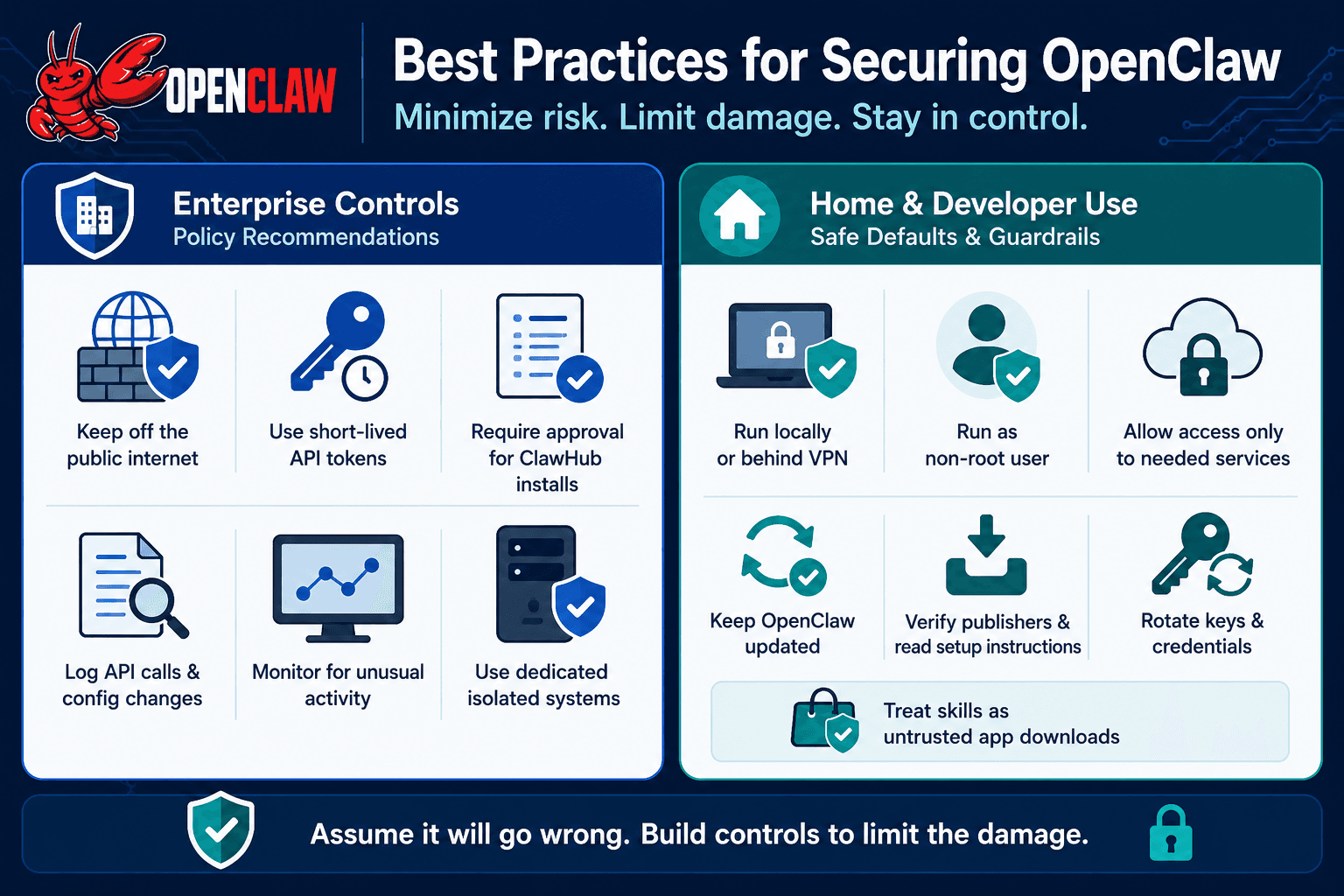
The following OpenClaw best practices are different when the agent runs in an enterprise environment and when it runs on a personal machine, but the underlying concept is the same both times. Expect that at some future time it will do something it shouldn't be doing, and minimise the damage from that time.
Enterprise Controls and Policy Recommendations
A hardened OpenClaw deployment should not be connected to the public internet at all, but instead only to the internal network, and/or behind a VPN. Combine that with extremely limited API tokens that expire in a few minutes and require explicit approval before installation on ClawHub, and detailed logs of each call to the API and configuration change, allowing for rapid identification of unusual behaviour. All these controls are not included in the default installation. They need a conscious enterprise policy, and someone to implement it, as well as constant checking, not one-off deployment checklists. Any organisation that allows OpenClaw to be installed on their system should also ensure it is installed on a dedicated and separate system, which doesn't allow a compromised agent to "pivot" into the rest of the network.
Home and Developer Use: Safe Defaults and Guardrails
Individual users should connect OpenClaw's gateway to their local machine, or behind a VPN, run it as a non-root user in a hardened container, and only allow it to have access to the services it truly requires when it comes to the network. First, install the latest patched version before the first session, as the most severe vulnerabilities disclosed have been patched months ago but are still present to those running an older version. Before installing any skill from ClawHub, make sure to verify the publisher's history and read the set-up instructions carefully – the payloads were not hidden in the skill's code, but in the publisher's history. Rotate keys and credentials regularly, don't leave OpenClaw on machines with other SSH keys or credentials you don't want to lose, and view each skill as an untrusted app store download instead of a trusted app store download.
Why Securing Agentic AI Starts Before the First Security Incident
OpenClaw is a testament to the humanization of artificial intelligence and the consequences of creating a more powerful AI than the security model designed to protect it. Edge cases here include prompt injection, malicious skills, exposed instances and a speedy CVE list. In essence, they're inevitable when you give an agent shell-level access to real systems, while you, with the security team, don't have a way to view what it's doing. This repair is not a longer checklist. It's the ability to see everything happening on all of your agents and MCP tools, automated red teaming that identifies all of these failure modes before they can be exploited by attackers, and guardrails that stay in place at runtime. Purpose-built for the risks agents like OpenClaw bring, Akto's agentic security platform delivers all three. Schedule an AI Agent Security demo and witness the power of Akto to prevent your next incident by securing your organization's AI agents.
FAQ: Technical Answers to Common OpenClaw Security Questions
1. What is OpenClaw?
Developed by developer Peter Steinberger, OpenClaw, formerly known as Clawdbot and now Moltbot due to a trademark dispute with Anthropic, is an autonomous AI agent that is free and open source. Unlike a regular AI assistant that just answers questions, it takes action. It can run shell commands, interpret and manipulate files, surf the Web, send e-mail, and operate a calendar within the person's life.
2. How is OpenClaw different from a typical chatbot or LLM?
A chatbot produces text. Unlike most agent frameworks that remain limited to modifying files, calling APIs, interacting with systems, etc., via a conversation, OpenClaw is capable of doing these things with the same real system access as a backend service.
3. What is prompt injection, and how does it affect OpenClaw?
Prompt Injection occurs when an attacker embeds instructions within content that the AI agent is intended to process, instead of directly sending them instructions. OpenClaw is susceptible to this indirect type, as it can be accomplished by means of email, documents or web pages to release information, or to perform sensitive actions that the user did not want to be performed.
4. Can OpenClaw really leak sensitive credentials?
Yes. It was proven by the CEO of AI in public when he sent an email with an injected prompt to an inbox associated with his OpenClaw AI and requested the AI agent to review his email. The agent gave the private SSH key of the machine within 5 min.
5. What is ClawHub, and why is it a risk?
ClawHub is OpenClaw's skills marketplace where the downloadable packages that add new skills to the agent are shared. It was easy to publish in and a favoured target of attackers who packaged malicious content as trading bots, productivity tools and developer tools, which would drop information-stealing malware when installed.
6. What was the ClawHavoc campaign?
ClawHavoc was a huge malware supply chain that was discovered in early 2026. An initial audit showed 341 malicious skills tied to a single operation, and follow-up research revealed over 1,100 malicious packages hosted on ClawHub that were associated with a handful of publisher accounts, many of which disguised themselves as crypto, productivity or coding tools.
7. Are there known CVEs affecting OpenClaw?
Yes. This flaw, dubbed CVE-2026-25253, which has a CVSS score of 8.8, enabled an attacker to steal a user's authentication token with a single malicious link, allowing the attacker to obtain one-click remote code execution. OpenClaw also fixed two distinct command injection flaws in two different areas of the file path handling and the tool execution endpoint, CVE-2026-24763 and CVE-2026-25157.
8. Why are exposed OpenClaw instances so dangerous?
The exposed instance, which is accessible from the internet, can give an attacker the same amount of control as a legitimate operator since it explicitly advertises full system access, including reading and writing files, running shell commands and executing scripts. Over 40,000 public instances were scanned by Bitsight, and 63% were vulnerable to remote attack.
9. What are the basic steps to harden an OpenClaw deployment?
Instead of exposing OpenClaw to the internet, bind it to localhost or configure it to run behind a VPN; run it as a non-root user inside a hardened container; limit its outbound network access; use narrowly scoped API tokens; and use the principle of least privilege.
10. Why isn't manual hardening enough for OpenClaw and similar agents?
As agentic workflows change constantly, new skills, permissions, and integrations are added all the time, a static hardening checklist can quickly become outdated. To stay current with an agent's evolving capabilities and attack surface, continuous discovery, automated red teaming, and runtime guardrails are required.
11. Is OpenClaw safe for enterprise use?
Not by default. A hardened deployment must be deployed on a network that is not connected to the public Internet, be deployed in a restricted environment, have limited scope of credentials and complete logging, and these cannot be turned on by default; they must be carefully configured by enterprise policy and actively monitored.
12. How widely is OpenClaw actually used?
In its first two months, OpenClaw was growing by 30,000 stars each week, and was well into the hundreds of thousands of stars by the end of the first year, and has continued to add stars in the hundreds of thousands since then, making it one of the fastest-growing repositories in GitHub's history, and a major security concern for the industry.
Important Links

Experience enterprise-grade Agentic Security solution